TradeAssay brings in every trade from your broker, replays it on the chart and tests your setup on real history — so you know what works before you risk the next dollar.
Connect your broker once. TradeAssay's dedicated cloud servers stay connected to it around the clock, and every trade is journaled automatically moments after it closes — then placed back on its chart, exactly where you took it.
Connect MetaTrader, cTrader, Bybit, Binance, Hyperliquid or Interactive Brokers once. From then on TradeAssay's cloud servers journal your trades for you — no file to export, ever again.
cTrader, NinjaTrader or any of 40+ platforms: drop in the statement it already exports — CSV, Excel, HTML or XML, in any language. The columns are matched for you, and every row is checked before it's saved.
Send a screenshot of a trade, and its symbol, side, prices and times are read straight off the chart.
Type in the symbol, side, prices and size. The risk, the R and the P&L work themselves out as you go.
BybitFutures and spot
MetaTrader 5Cloud sync, 24/7
BinanceFutures and spot
XAUUSD-24-Sep.pngRead from the screenshot
1 / 4
Auto sync
Every trade journaled seconds after it closes
Connect your account once. TradeAssay's dedicated cloud servers stay connected to your broker 24 hours a day and journal every trade automatically, seconds after it closes — with its commission, swap, stop and target. Nothing to install, no VPS to rent, and your computer can stay off.
Read-only: no connection can open, change or close a trade
Every account on its broker's own clock, so each trade sits on the right candle
Deposits and withdrawals too, from MetaTrader 5 and the exchanges, so returns are measured on what you put in
Connect once, and TradeAssay's dedicated cloud servers keep each account in your journal around the clock. Every connection is read-only: it can't place, change or close a trade, or move money.
Platform
Sync
Sync method
MetaTrader 5Any MT5 broker or prop firm
Auto sync
TradeAssay cloud servers
MetaTrader 4Any MT4 broker or prop firm
Auto sync
TradeAssay cloud serversSent from your MetaTrader 4
cTraderAny cTrader broker or prop firm
Auto sync
TradeAssay cloud servers
BybitCrypto exchange
Auto sync
TradeAssay cloud servers
Bybit TRCrypto exchange · Türkiye
Auto sync
TradeAssay cloud servers
BinanceCrypto exchange
Auto sync
TradeAssay cloud servers
Binance TRCrypto exchange · Türkiye
Auto sync
TradeAssay cloud servers
HyperliquidOn-chain exchange
Auto sync
TradeAssay cloud servers
Interactive BrokersStocks, options, futures and forex
MetaTrader 5 and 4, cTrader, Bybit, Binance, Hyperliquid and Interactive Brokers sync automatically. NinjaTrader, TradingView, Tradovate and 40+ more import from the statement they already export.
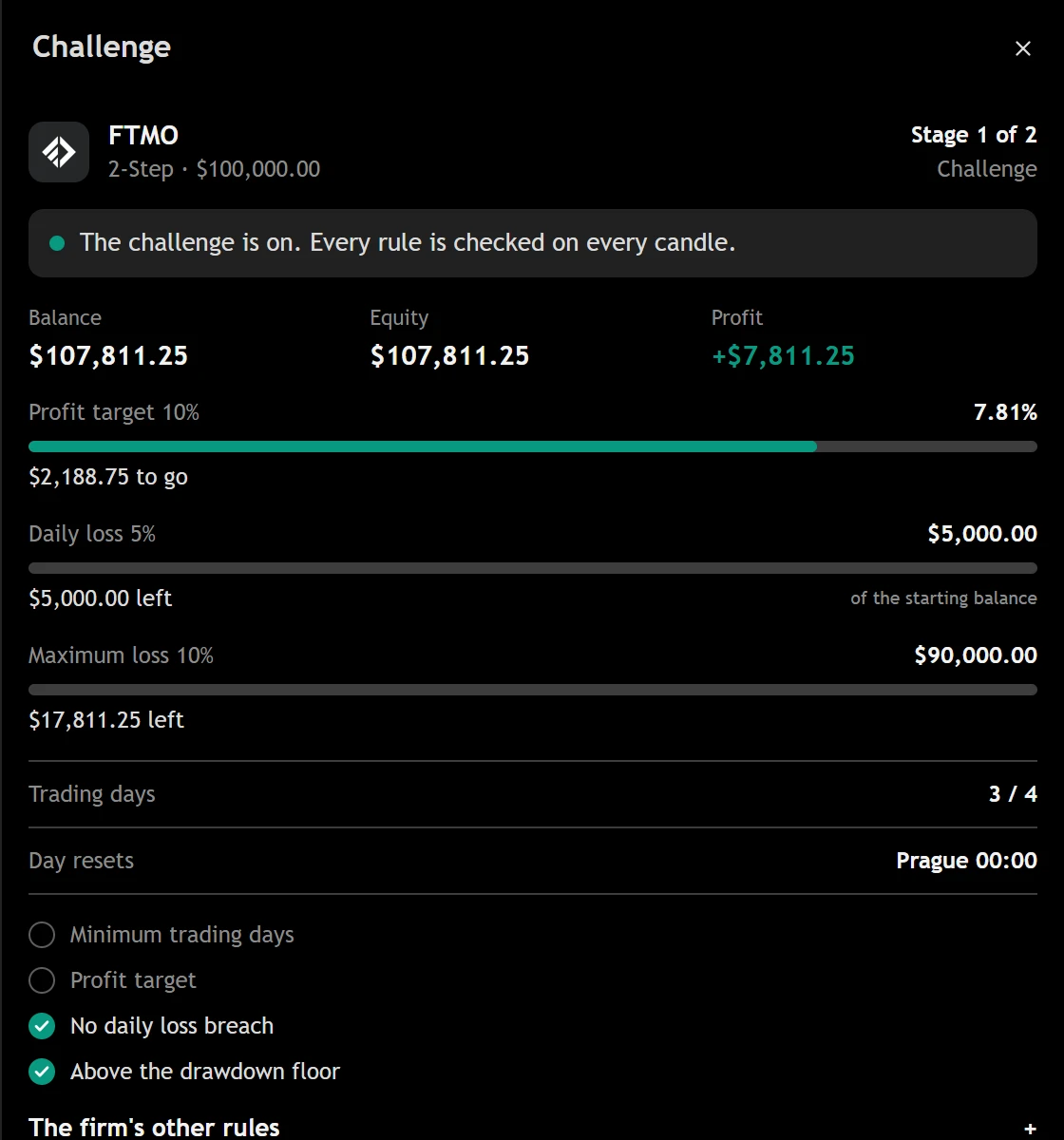
FTMO, FundedNext, The5%ers, Topstep and more — 18 in all, their rules built in. Connect the account like any other, and TradeAssay tracks the daily loss, the drawdown and the target the way the firm does.
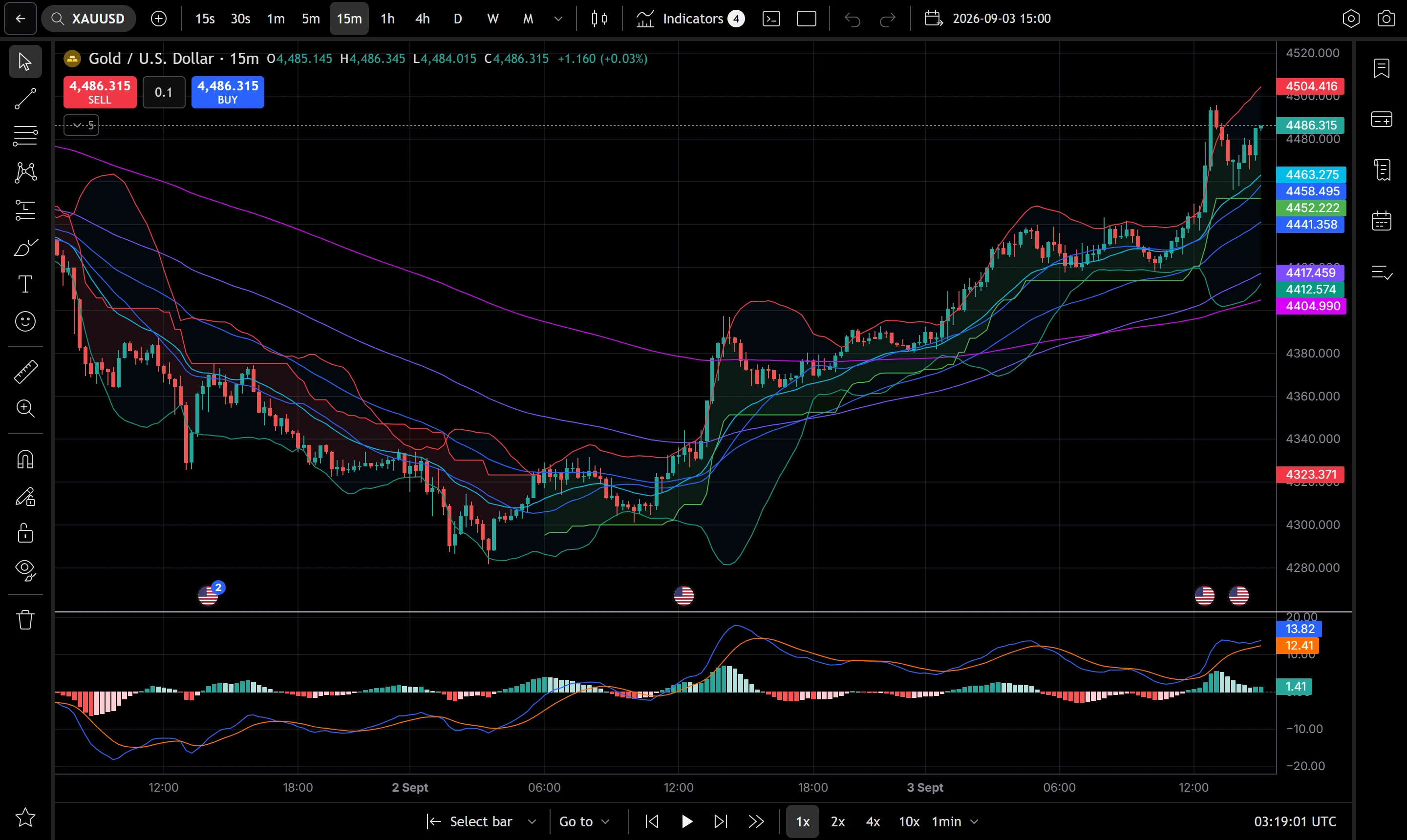
Pick any day, hide everything after it and trade it as if it were live — from a real order ticket, with a stop and a target, the replay at your pace. Real prices from banks and exchanges, a new day added every day.
Pick Supertrend or another ready strategy and the Strategy Tester runs it over years of real candles: profit, drawdown, win rate and every trade, the way TradingView reports it.
Ready strategiesSupertrend, MACD, RSI, Bollinger Bands, moving-average cross and channel breakout — one click in Indicators.
Build one by handWhen to buy, when to sell, where to get out — from hundreds of ready conditions, without code.
Test an indicatorPut an indicator on the chart and turn its lines into buy and sell conditions.
Your own codePaste a Pine Script® strategy and press Add to chart: it runs as it is.
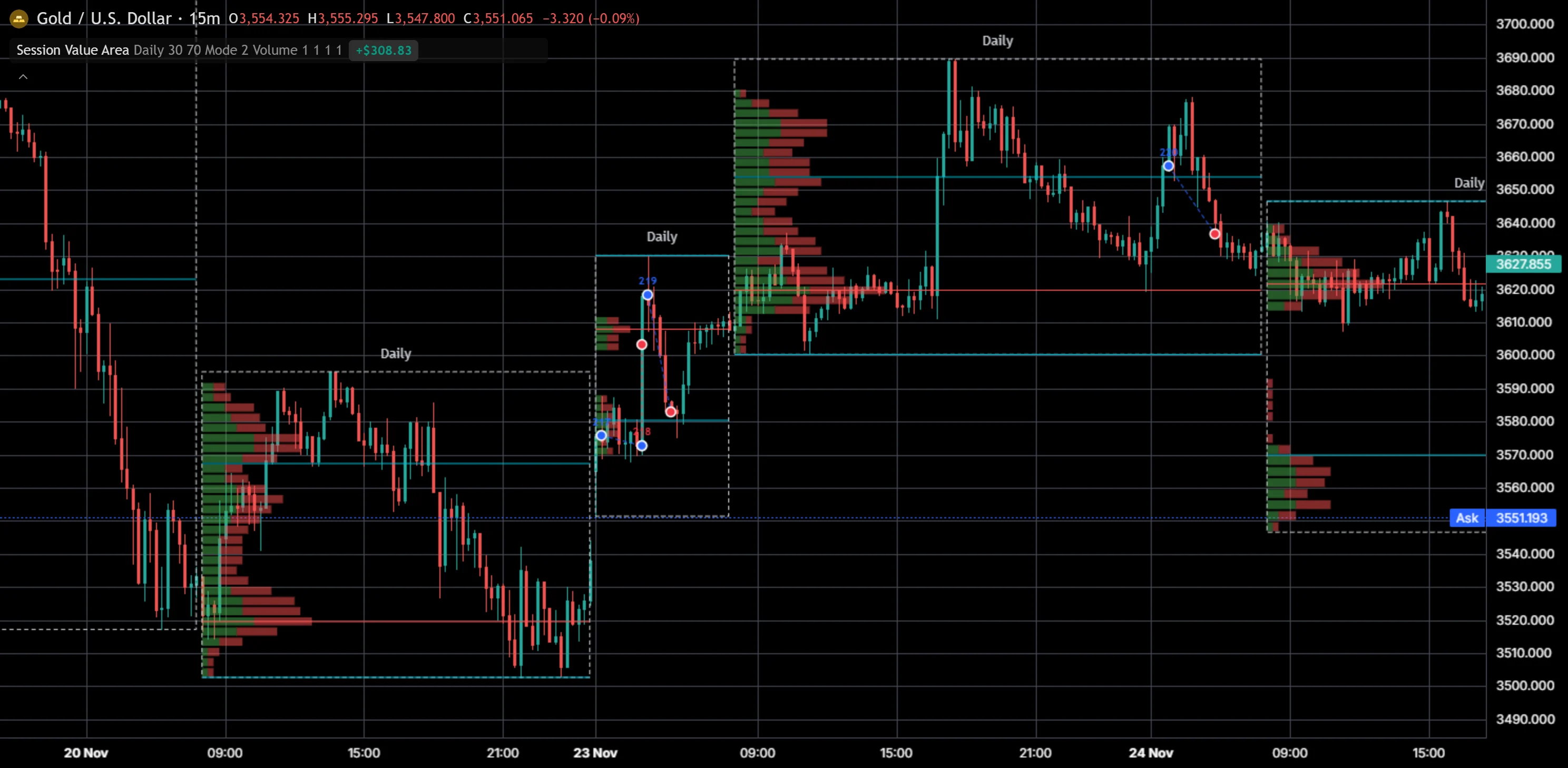
Every trade on the chartShow on chart takes you from the list of trades to the candles it happened on.
Automatic Backtest
Set the rules.Let the past test them.
Pick a symbol and a strategy — a ready one, one built without code, an indicator's signals or your own Pine Script® — set your risk, and TradeAssay tests it on real candles by itself. When it ends, Show on chart puts every trade on the candles.
Four kinds of strategyA ready one, one built without code, an indicator's signals, or your own Pine Script® strategy.
Your risk, your rulesSize by lots, % of equity or risk per trade; a stop in ATR, % or pips; a target in R; limits for the day.
Years of real candles762 symbols on 1-minute to 4-hour charts, over 3 months to 3 years or dates of your own.
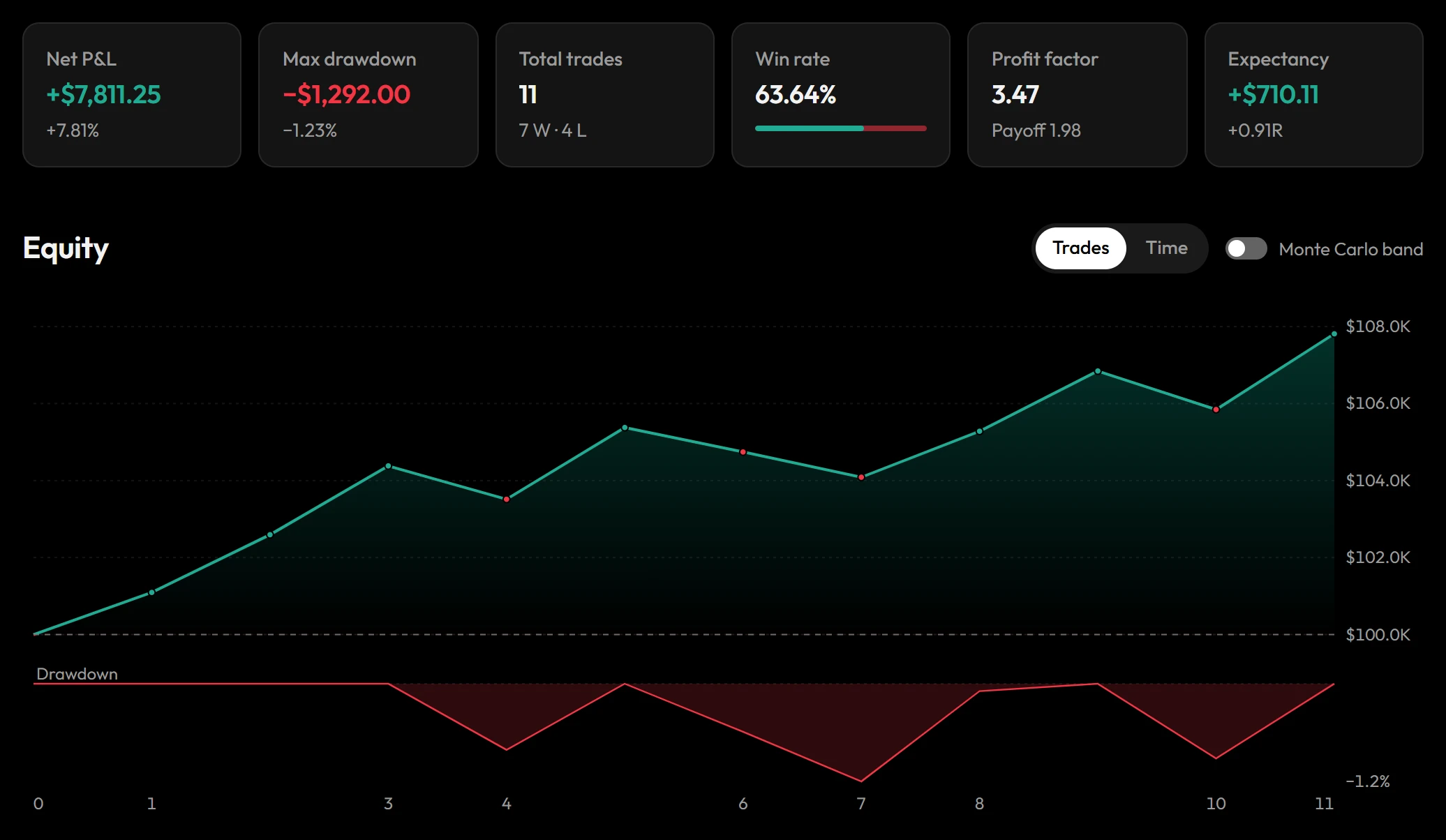
The whole reportNet P&L, win rate, profit factor, drawdown, the equity curve and every trade — and all of it as a PDF.
Every trade on the chartShow on chart opens the candles with each entry and exit marked, numbered as in the list of trades.
Auto Test
Will your strategy pass?Let the firm's rules decide.
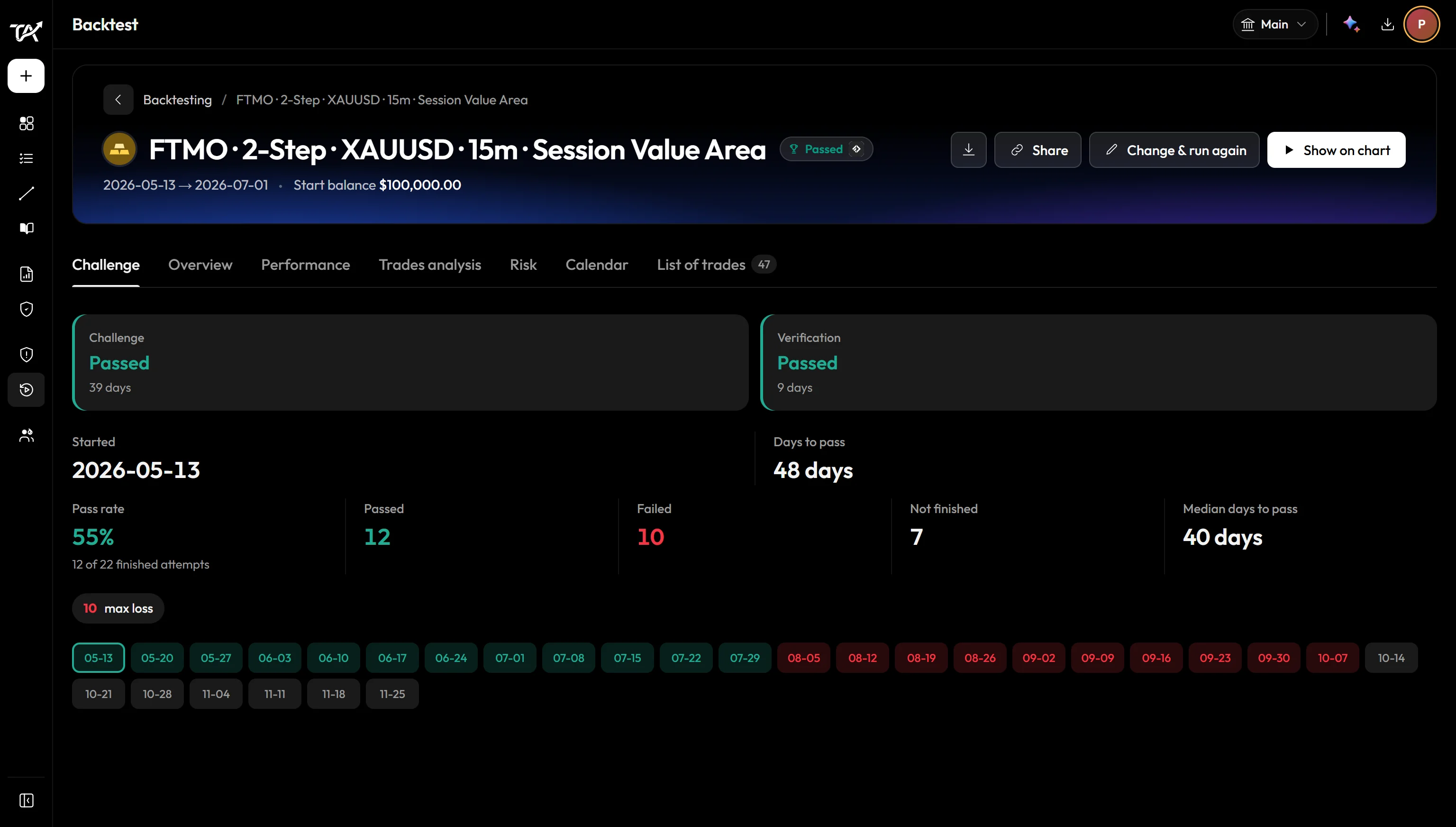
Pick a prop firm, one of its challenges and an account size, then your strategy and your risk. TradeAssay plays the challenge on real candles by itself, every rule checked the way the firm checks it, and starts it again every week of the period: the first attempt's verdict, and how often it passes.
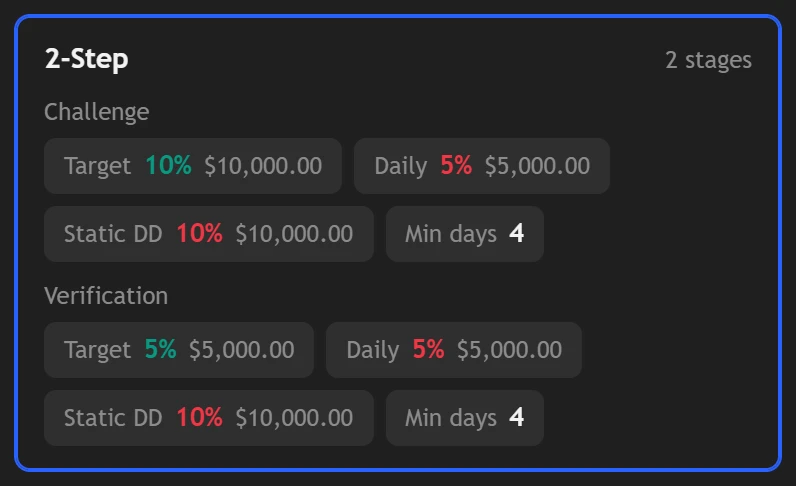
18 firms, as they sell itFTMO, FundedNext, The5%ers, Topstep, FundingPips and more: each challenge's target, daily loss, maximum loss and minimum days.
Checked to the minuteWherever a limit is close, each candle is opened into its 1-minute candles, and the day resets at the firm's own hour.
Stage after stageA stage passes when every rule is met with nothing open; the next one starts at once on a fresh balance.
A pass rate, not one lucky runThe challenge starts again every week of the period: how many attempts passed, how many failed and on which rule.
Every trade on the chartThe first attempt's trades on the candles, and the backtester's whole report after the challenge's own.
Prop Firm
Practise the challengebefore you pay for it.
Pick a firm and one of its challenges and take it on history first, the firm's own rules checked on every candle. When you buy the real one, track it here — every rule, every day, every payout.
Each challenge as the firm sells it: every stage with its target, daily loss, drawdown and minimum days, in dollars for your account size.
A day you can't remember
The exam starts on a random day in the past, so you can't recall what the market did next — and the daily loss starts again at the firm's own hour, midnight in Prague for FTMO.
Every rule on every candle
Target, daily loss, maximum loss and trading days, checked candle by candle — a broken rule ends the attempt, as the firm would end it.
See how the exam went
When it ends, the exam has a report of its own — net P&L, drawdown, win rate, profit factor and expectancy, then the equity curve, the calendar and every trade. Start again whenever you like.
Your challenges
Each challenge you are taking, at any firm: its equity, how far it is from the target and from the floor, the daily loss it has left and the days it has traded — worked out from the account's own trades.
Its equity read like a price with the firm's rules beside it, each rule a gauge in dollars, and the equity drawn against the target and the floor.
Each day as the firm counts it, from its own hour: the trades, the P&L, how much of the daily limit it used — and the best day marked.
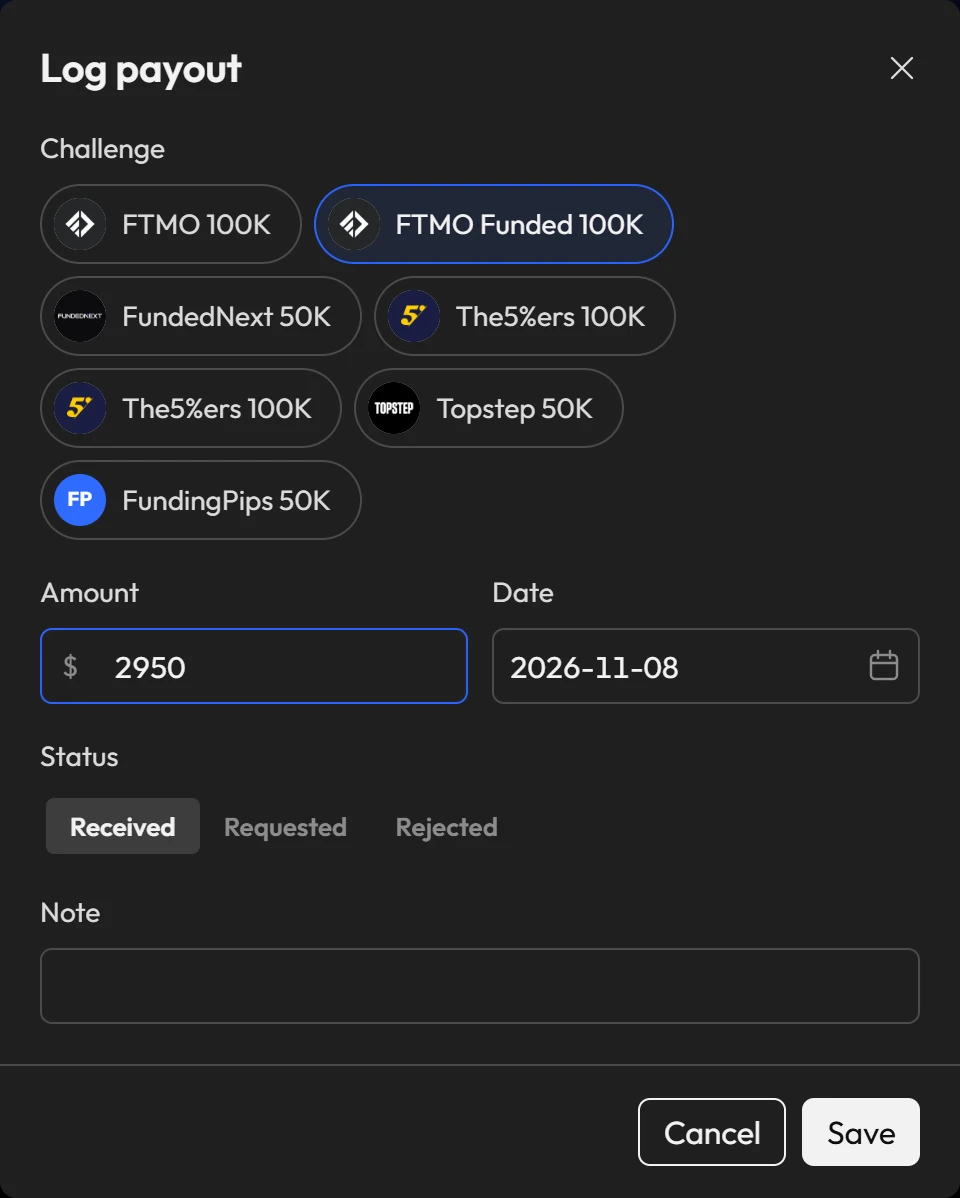
Log each payout — received, requested or turned down — and each challenge's fee: what every account cost you and what it paid back.
Finished challenges stay on record with the day they closed; above them, how many are live, your pass rate, the fees paid, the payouts received and the net.
1 / 5
Analysis
Numbers that tell youwhat to do next.
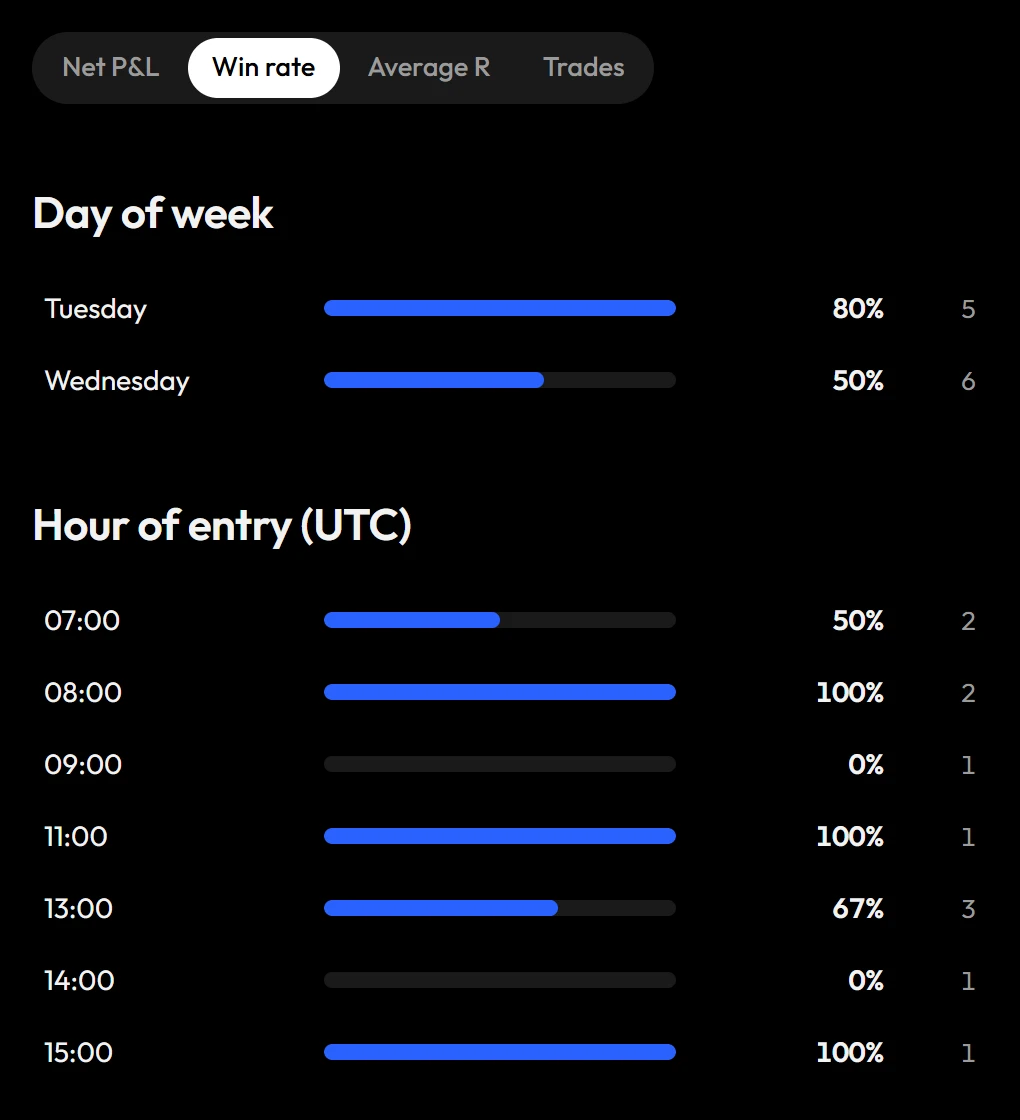
Your trades, read for you: which days and hours pay you, what breaking your rules has cost, how much risk you really run — and the trades behind each number are one click away.
Every angle
By symbol, side, session and killzone — each with its net, win rate, average R and profit factor — so the markets and the hours that pay you stand out.
What each mistake has cost you in money, what re-entering after a loss does to you, and whether your busiest days are your worst.
A thousand reshuffles of your own trades: how likely you are to end in profit, the drawdown to expect, and the chance of losing half the account.
How much of each move you kept, what you left on the table, and whether you hold losers longer than winners.
Any two sets side by side: the plan followed against the plan broken, clean trades against mistakes, this month against last.
1 / 5
Net P&L+$31,234.0745 trades
Profit factor3.11$ won for every $ lost
Win rate53.3%24 won · 21 lost
Cost of broken rules−$17,484.2216 trades taken off-plan
Pick any trade from your list and it opens on its own chart — entry, exit, stop and target exactly where they happened, in your broker's time. Press play to relive it from the entry, candle by candle.
Every trade in one list, grouped by day with the day's result. Pick one and it opens on its own chart, right where it happened.
The result, the fees, the risk and the R, the prices it filled at, and how far it ran either way. Play from entry replays it, candle by candle.
Write down what you saw beside the chart you saw it on, above the screenshot you took at the time.
Tick the rules of your playbook you actually followed, and see at a glance how closely the trade kept to your plan.
Your mentor's rating out of ten and their comments, right beside the trade they are about.
1 / 5
Your broker's clockEvery account on its broker's own time, so each trade sits on the right candle.
15 seconds to dailySeconds charts on symbols with seconds data, then every timeframe from 1 minute to a day.
Indicators and drawingsTradingView-style drawing tools and indicators, and the Pine scripts you paste in.
All your trades at onceEvery trade you took on a symbol, on one chart, to see how you trade it.
SnapshotThe chart as a sharp picture in one click, to keep or to share.
How far it ran for you, and against you
Every trade measured on the market's own bars: the best price it reached, the worst, how much of the move you kept, and its P&L from entry to exit, bar by bar.
What if, and trades like it
What it would have made held to its target or stopped out, and its risk next to your usual. Then how your trades did at the same hour, on the same weekday, in the same session and on the same market.
Playbook
Your rules,priced in dollars.
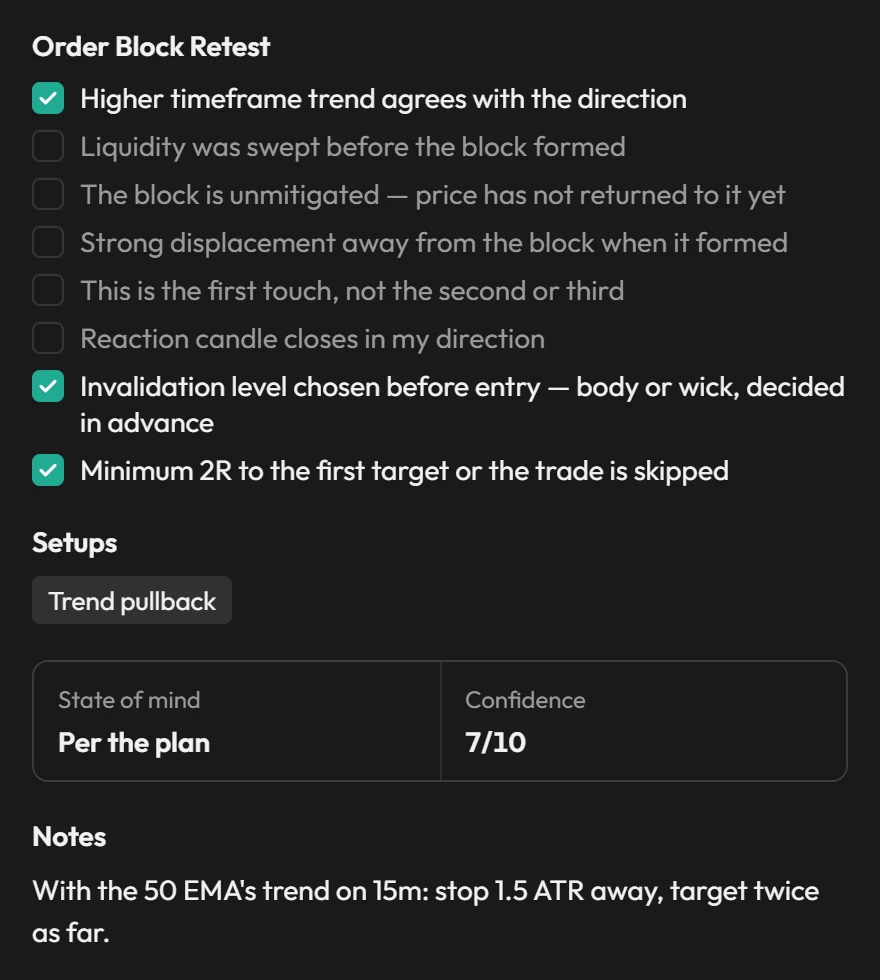
Setups as checklists, checked on every trade — and the money made when you followed them, set beside what you made when you didn't.
A checklist before you enterOpen the setup's checklist and tick its rules — it counts the required ones still open.
Followed against brokenWhat your trades made when you followed the rules, set beside what they made when you didn't.
What each rule is worthHow often you keep each rule, and what your trades make with it and without it.
10 setups to start fromSilver Bullet, Order Block Retest, Opening Range Breakout and more — ready to make your own.
Live and backtest apartEach playbook counts your live trades and your backtest trades on their own.
Scripts
Bring your own indicators.Test them on the past.
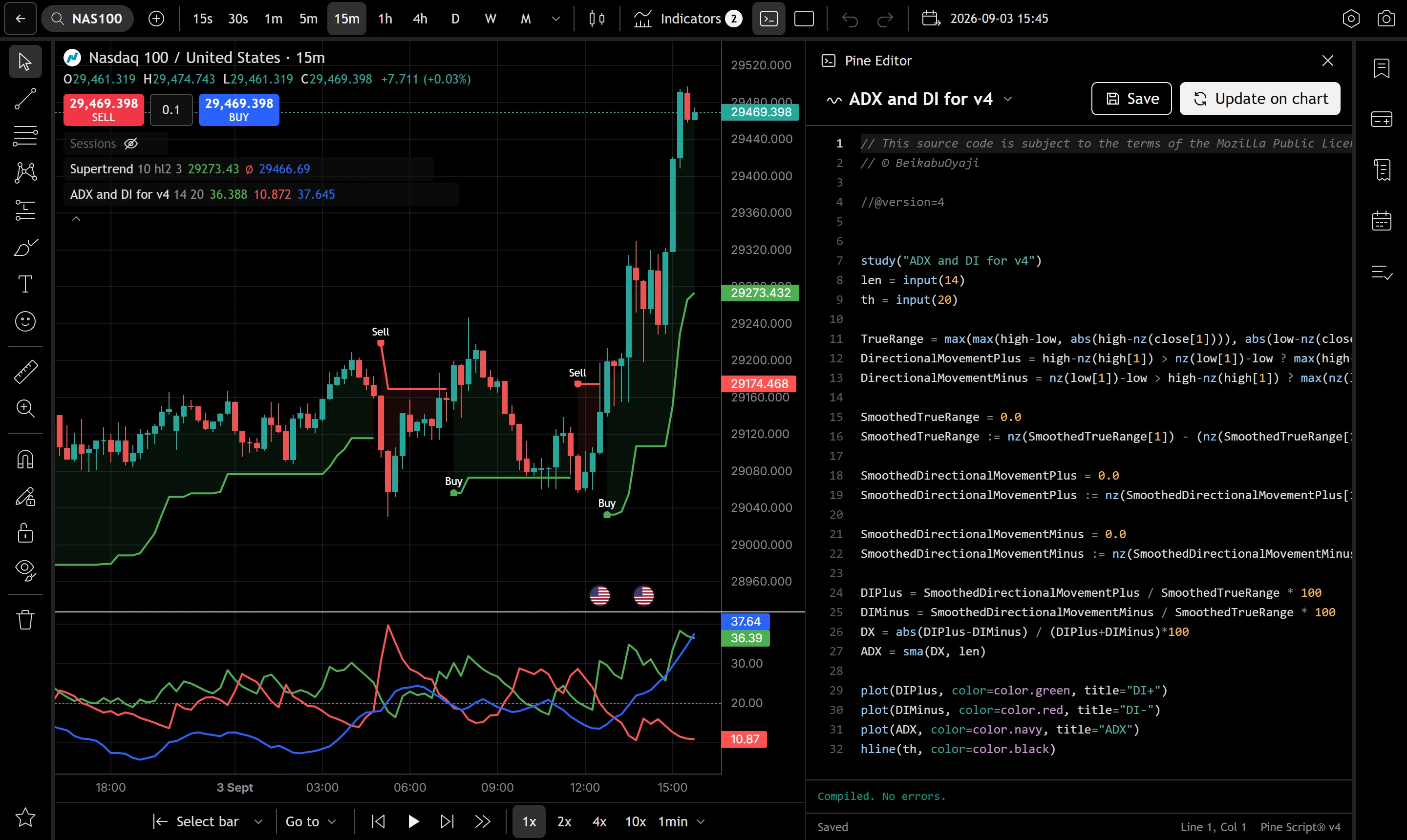
Paste an indicator's Pine Script® — the language TradingView's indicators are written in — or pick one of 83 built-ins. Set its inputs and colours, then replay the market with it bar by bar, in as many backtest sessions as you like.
Paste from TradingViewPine Script® v5 and v6 indicators run as they are — and v4 classics too, like the Supertrend above.
83 built inMoving averages, RSI, MACD, Ichimoku, Supertrend, pivot points and more — find one by name and add it.
Never sees the futureOn the replay an indicator is worked out bar by bar, from the candles you have been shown — nothing after them.
Errors at their lineA script that won't run says why, at its line and column, before it ever reaches the chart.
Settings like TradingView'sInputs, Style and Visibility, live on the chart — and your own defaults kept for next time.
Mentor
Your mentor seeswhat you see.
Enter your mentor's code and they read your real journal — every trade, chart and note — without changing a thing. Their desk shows first who needs them; they rate the execution from 1 to 10, comment by text, voice or picture, set tasks and pause a symbol for a while.
Who needs you firstThe desk orders your students by what their own trades say: a losing run, re-entries minutes after a loss, a day far busier than usual, an unread message.
Feedback on the trade itselfThe execution rated from 1 to 10, and comments by text, voice or picture — on the trade itself, not on a screenshot of it.
Tasks and paused symbolsTasks with a due date and a priority. A paused symbol is a reminder in the student's trade form, not a lock — and the mentor sees each trade taken during the pause.
A weekly brief, ready to sendEach student's week in figures — trades, net, win rate, the best and the worst symbol, the mistake most tagged — written for you to edit and send.
Read-only, by one codeA mentor sees everything and changes nothing. A student joins with the mentor's code — and can disconnect at any time.
Auto sync: MetaTrader, cTrader, Bybit, Binance, Hyperliquid and IBKR
MetaTrader 5 cloud sync
Trade Charts replay
Prop-firm rules and daily breaker
Analysis and AI
Overview and core analysis
Scores and period comparison
AI assistant
AI chart analysis
Voice journal
PDF / CSV export: this month
Coaching and support
Coach your own students
Join a mentor as a student
Playbooks with checklists
Support tickets
Pro
Best value20% off30% off50% off
$9.99$9.00$7.20$8.00$5.60$6.67$3.33/mo
billed monthly$9.99$26.99billed every 3 months$26.99$21.59for the first 3 months$47.99billed every 6 months$47.99$33.59for the first 6 months$79.99billed yearly$79.99$39.99for the first year
Auto sync: MetaTrader, cTrader, Bybit, Binance, Hyperliquid and IBKR
MetaTrader 5 cloud sync: 10 accounts
Trade Charts replay
Prop-firm rules and daily breaker
Analysis and AI
Overview and core analysis
Scores and period comparison
AI assistant: 3,000 messages a month
AI chart analysis
Voice journal
PDF / CSV export: any range
Coaching and support
Coach any number of students
Join a mentor as a student
Playbooks with checklists
Priority support
No card for the free planCancel any timeNothing deleted if you stop payingRead-only broker access
Black Friday prices are for orders placed by Tuesday 1 December, 23:59 Istanbul time. A card subscription renews at the regular price, and you can cancel it any time; a crypto payment never renews by itself.
Ways to pay
Card or wallet
Through Paddle.com, our merchant of record. A card subscription renews until you cancel it. Apple Pay and Google Pay appear on devices that support them, except in Turkey and India.
Crypto
USDT, USDC, Bitcoin, Ethereum, Solana or TRON, on Tron, BNB Smart Chain, Ethereum, Solana or Bitcoin. Pays for 1, 3, 6 or 12 months and never renews by itself.
On Pro and Elite, TradeAssay's dedicated cloud servers sync MetaTrader 5 with your read-only investor password — nothing to install, even with your computer off — Bybit and Binance with a read-only API key (futures and spot, and their Turkish sites Bybit TR and Binance TR), Hyperliquid with just your wallet address, and Interactive Brokers with a read-only Flex token, and cTrader with a read-only sign-in you approve on cTrader; MetaTrader 4 syncs from your own terminal while it runs. On every plan, anything else imports from the file it already exports — MetaTrader's own report (Excel, HTML or XML, in any terminal language), or the CSV or Excel export of TopstepX, Tradovate, NinjaTrader, TradingView and 40+ other platforms — or you can log a trade by hand, or give the AI a screenshot and let it fill the trade in.
Is the backtest data real market data?
Yes. 762 symbols of real historical prices. Forex, metals, stock indices, commodities, bonds and stocks come from Dukascopy's historical data — forex and gold in 1-minute bars since 2003 — alongside CME futures since 2010 and 431 crypto pairs since 2017. Charts run from 1 second to 12 months: every symbol from 1 minute up, and 188 of them in seconds too, on Elite. They are drawn with TradingView's Lightweight Charts, and a new day is added every day. The symbols page lists every one and how far back it goes.
What can the backtester do?
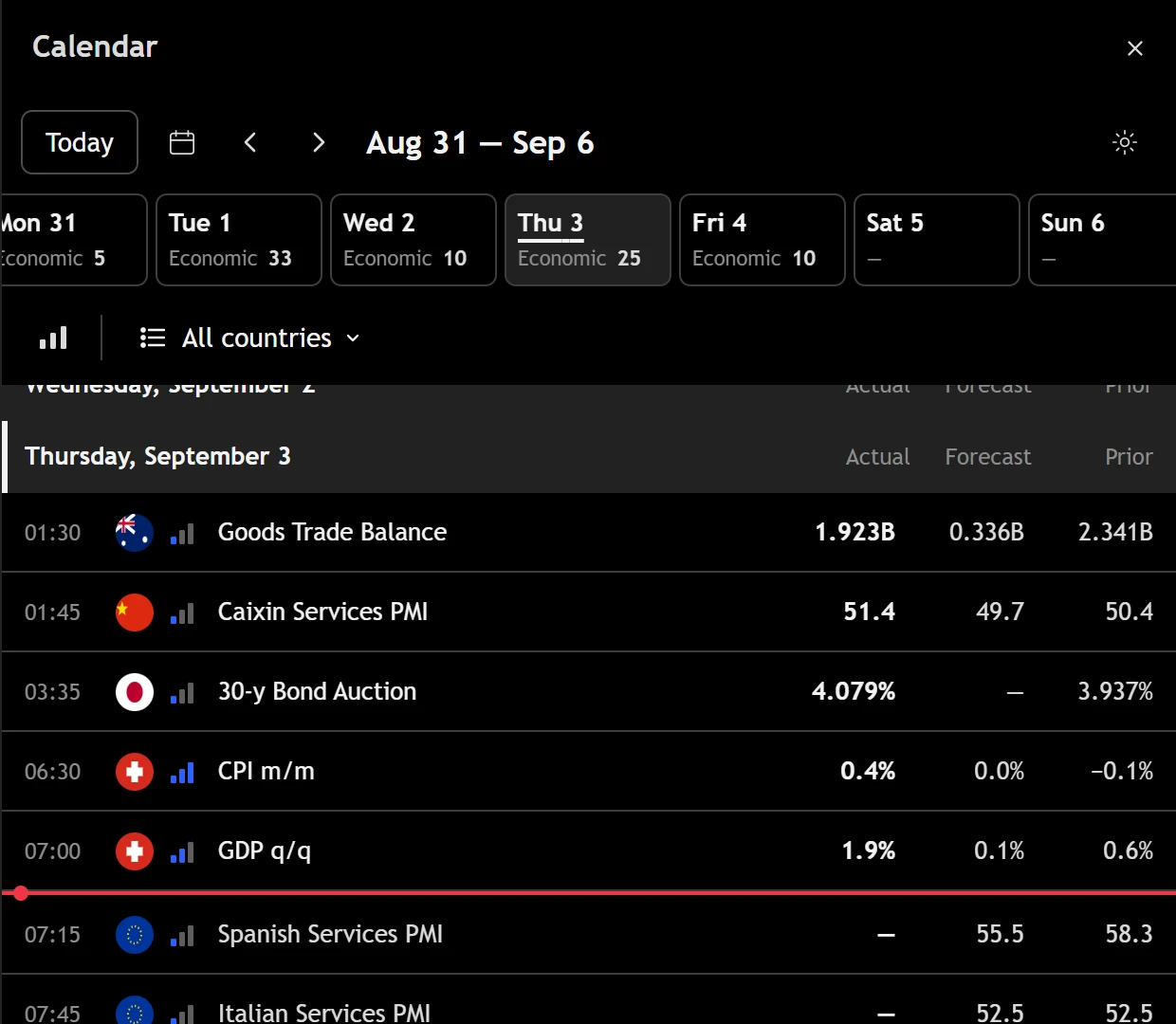
Pick any day, hide everything after it and trade it bar by bar as if it were live, on 1-second to 12-month charts — up to 16 charts in sync. Orders go in from a real order ticket — market, limit and stop, with a stop loss and a take profit you drag on the chart — and fill where price really touched them. TradingView's built-in indicators, your own Pine scripts, drawing tools, Compare and the economic calendar's news all work on the replay; every session gets its own analysis, and a prop firm's rules can be checked on every candle.
Do backtest trades mix with my live numbers?
No. Backtests live in their own practice account. Your live statistics stay clean, and the backtest still gets every report, chart and breakdown.
Can the connection place trades on my account?
No. Every connection is read-only: it sees your history and open positions and cannot place, change or close an order, or move money. MetaTrader 5 cloud sync accepts only your read-only investor password, encrypted in your browser, and refuses and deletes a main password at once; a Bybit or Binance API key that could trade or withdraw is refused; cTrader connects through a view-only cTrader ID sign-in; Hyperliquid needs only your public wallet address.
What happens to my data if I stop paying?
Nothing is deleted. Your trades, notes and screenshots stay where they are; Pro features lock, and unlock again the moment you renew. You can export everything to CSV or PDF at any time.
Is there a free trial?
Yes, and it starts by itself: a new account gets 7 days of Pro, with no card. The free plan itself never expires, so you can keep a real journal for as long as you like and upgrade only when you want more.
How do I pay?
By card or wallet — Visa, Mastercard, American Express, PayPal, Apple Pay or Google Pay — through Paddle.com, our merchant of record; or in crypto — USDT, USDC, Bitcoin, Ethereum, Solana or TRON, on Tron, BNB Smart Chain, Ethereum, Solana or Bitcoin. Prices are in US dollars.
Does it work on my phone, and in Persian?
Yes to both. The whole app runs in any mobile browser and installs to your home screen, and every screen, report and AI answer is available in English and Persian.
Your next trade deserves a reason.
Bring in your history and see what it says — free, in a few minutes.


 BybitFutures and spot
 MetaTrader 5Cloud sync, 24/7
 BinanceFutures and spot


 FTMO
 Topstep
 SGB
 Trade Stars
 Prop Plus
 FeneFX
 FundedNext
 Apex Trader Funding
 Robinsood
 Invest Prop
 Arya Investor
 Combat Capital
 The5%ers
 MyProp
 ProopCo
 Prop Dara

 EURUSD
 GBPUSD
 USDJPY
 AUDUSD
 USDCAD
 USDCHF
 NZDUSD
 GBPJPY
 EURJPY
 XAUUSD
 XAGUSD
 WTI
 BRENT
 NATGAS
 COPPER
 NAS100
 US500
 US30
 US2000
 GER40
 UK100
 JP225
 HK50
 DXY
 VIX
 NQ
 ES
 YM
 RTY
 GC
 CL
 AAPL
 TSLA
 NVDA
 MSFT
 AMZN
 META
 GOOGL
 NFLX
 AMD
 JPM
 BTCUSDT
 ETHUSDT
 SOLUSDT
 XRPUSDT
 BNBUSDT
 DOGEUSDT
 ADAUSDT