EnglishفارسیTürkçe

Features

Journal Backtest Strategy Tester Automatic Backtest Auto Test Prop Firm Scripts Replay & Trade Charts Analysis Playbook Mentor Broker sync

Resources

Pricing Learn Forex calculator Crypto futures calculator Symbols Supported brokers Sign in Get started
ProductAutomatic Backtest

Set the rules. Let years of real candles test them.

Choose a symbol, give it a strategy — a ready one, one built without code, an indicator's signals or your own Pine Script® — and set your risk. The Automatic Backtest trades it over the history you pick by itself, then gives you the whole report and every trade on the chart.

In a minute

Four kinds of strategy
9 ready strategies, one built from conditions without code, an indicator's buy and sell signals, or a Pine Script® strategy of your own.
Your money management
Size by lots, % of equity or risk per trade; a stop by %, ATR, pips or points; a target in R or %; limits for the day.
Real candles
762 symbols with real minute history — forex and gold since 2003 — on 1-minute to 4-hour charts.
Any period
The last 3 months, 6 months, 1 year or 3 years, or dates of your own from 2010 on.
The whole report
Net P&L, drawdown, win rate, profit factor, expectancy, the equity curve, a calendar and every trade — and a PDF of it.
Every trade on the chart
Show on chart opens the candles with each entry and exit marked, numbered as in the list of trades.

How it works

  1. Open Backtest › AutomaticSwitch the Backtest tab to Automatic and choose Strategy test.
  2. Choose a symbol and a strategyAny of 762 symbols, then a ready strategy, conditions of your own, an indicator's signals or Pine Script® code.
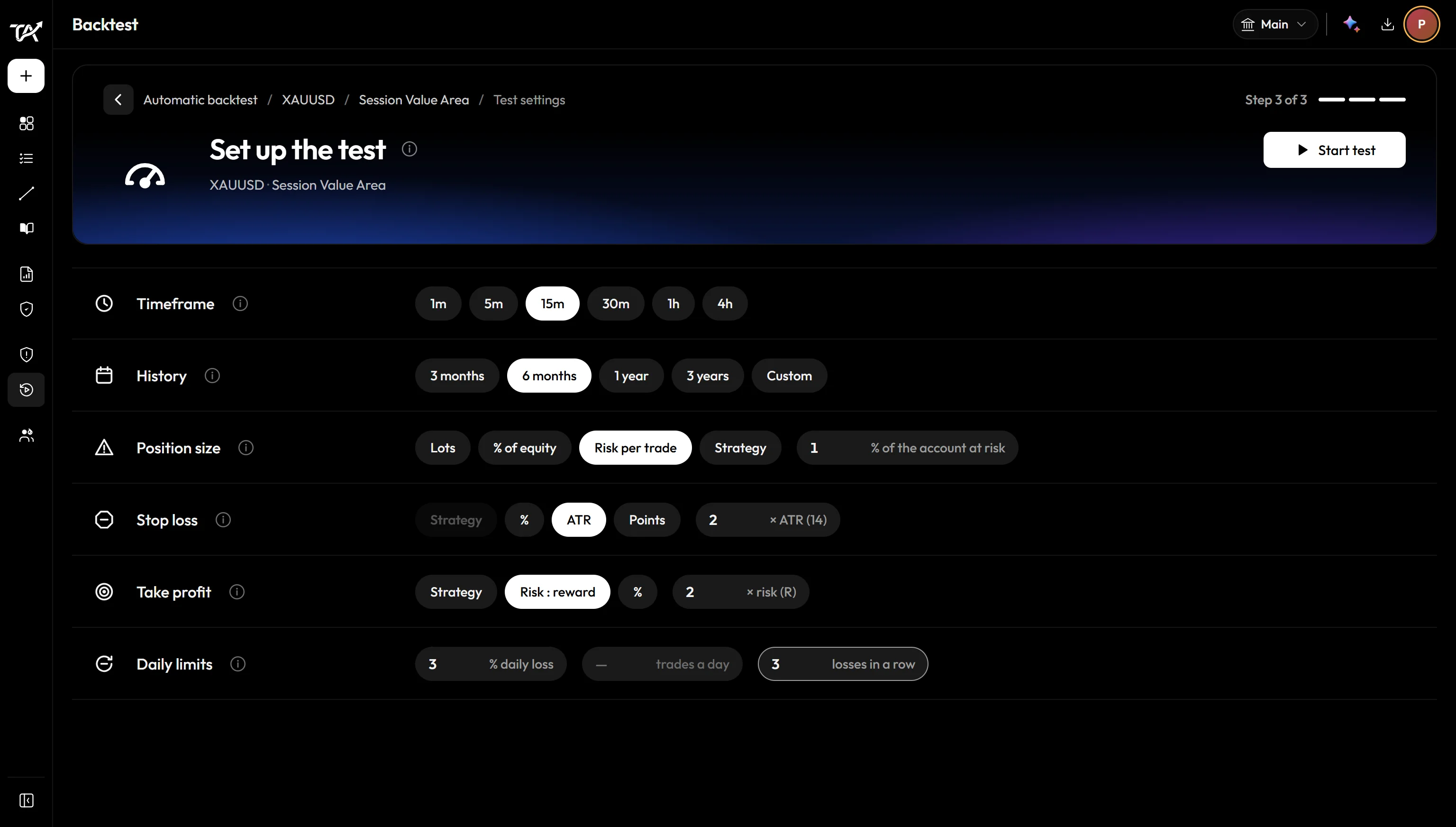
  3. Set up the testThe timeframe, how far back, the position size, the stop, the target and your limits for the day.
  4. Start testIt trades every candle by itself; the report opens when it ends, and Show on chart puts every trade on the candles.
What it tests

Four ways to give it a strategy.

Whatever your strategy is written in — or if it is not written down at all — there is a way in.

  • Ready strategies: Supertrend, MACD, RSI, Bollinger Bands, moving-average cross and channel breakout with the inputs TradingView's built-in strategies open with, and popular TradingView community strategies such as PMax Explorer and Flawless Victory.
  • Build without code: when to buy, when to sell and how to get out, every condition picked from a list — the Strategy Tester's own Strategy Builder.
  • Indicator signals: pick a built-in indicator or a script of your own; its buy and sell signals are read and turned into conditions you can change.
  • Pine Script®: paste a TradingView strategy() script. It runs bar by bar on TradeAssay's own Pine engine, and a line with an error is named with its number.
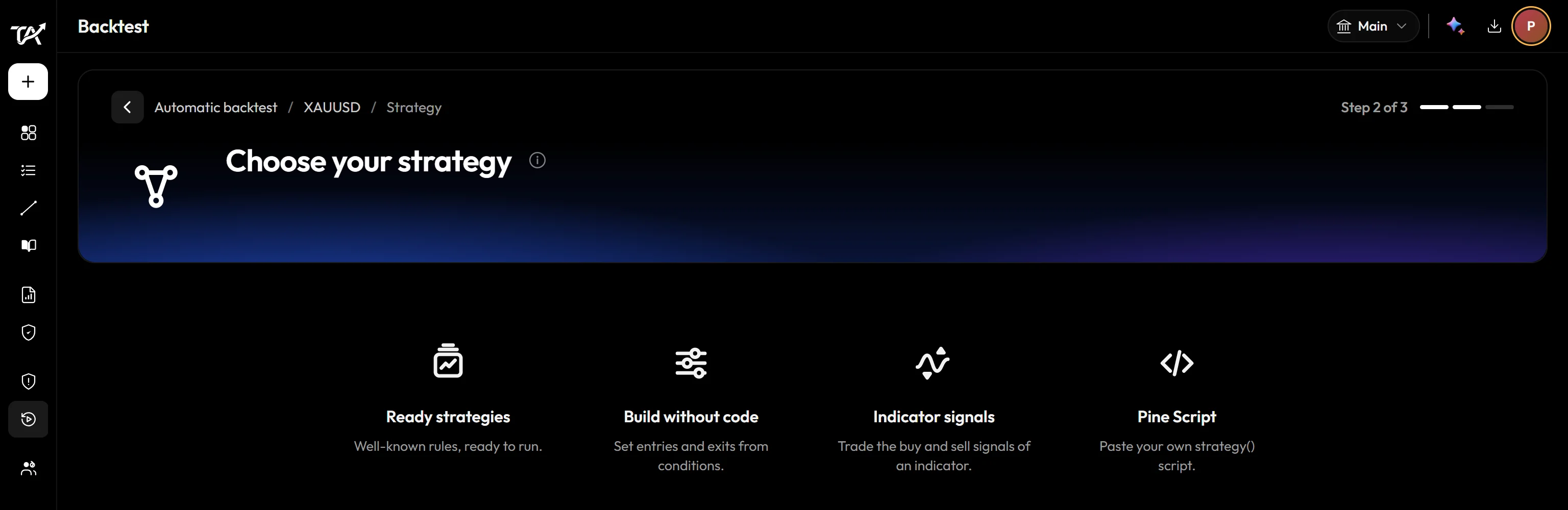
Step 2 of a strategy test on gold, Choose your strategy: Ready strategies — well-known rules, ready to run; Build without code — set entries and exits from conditions; Indicator signals — trade the buy and sell signals of an indicator; Pine Script — paste your own strategy() script.
Money management

Your risk rules, on any strategy.

Say how much each trade risks and where it gets out, and every trade of the test is sized and closed that way — whatever the strategy itself would do.

  • Position size: lots, a % of equity per order, the % of the account at risk at the stop, or the strategy's own size.
  • Stop loss: a % of the entry price, a multiple of the ATR (14), or a distance in pips or points — beside the strategy's own exits; whichever comes first closes the trade.
  • Take profit: a multiple of the stop's distance (R), or a % of the entry price.
  • Limits for the day: at your daily loss everything open is closed and nothing opens until the next day; a cap on trades a day and on losses in a row.
  • A strategy test starts on $100,000, and an account that falls to zero is closed for good, as a real one would be.
Set up the test, for gold and Session Value Area: timeframe 15m, history 6 months, position size Risk per trade at 1% of the account at risk, stop loss 2 × ATR (14), take profit Risk : reward 2 × risk (R), daily limits 3% daily loss and 3 losses in a row, and Start test.
The result

A whole backtest report, the moment it ends.

The test is kept as a backtest session, with the same report as a session you trade by hand.

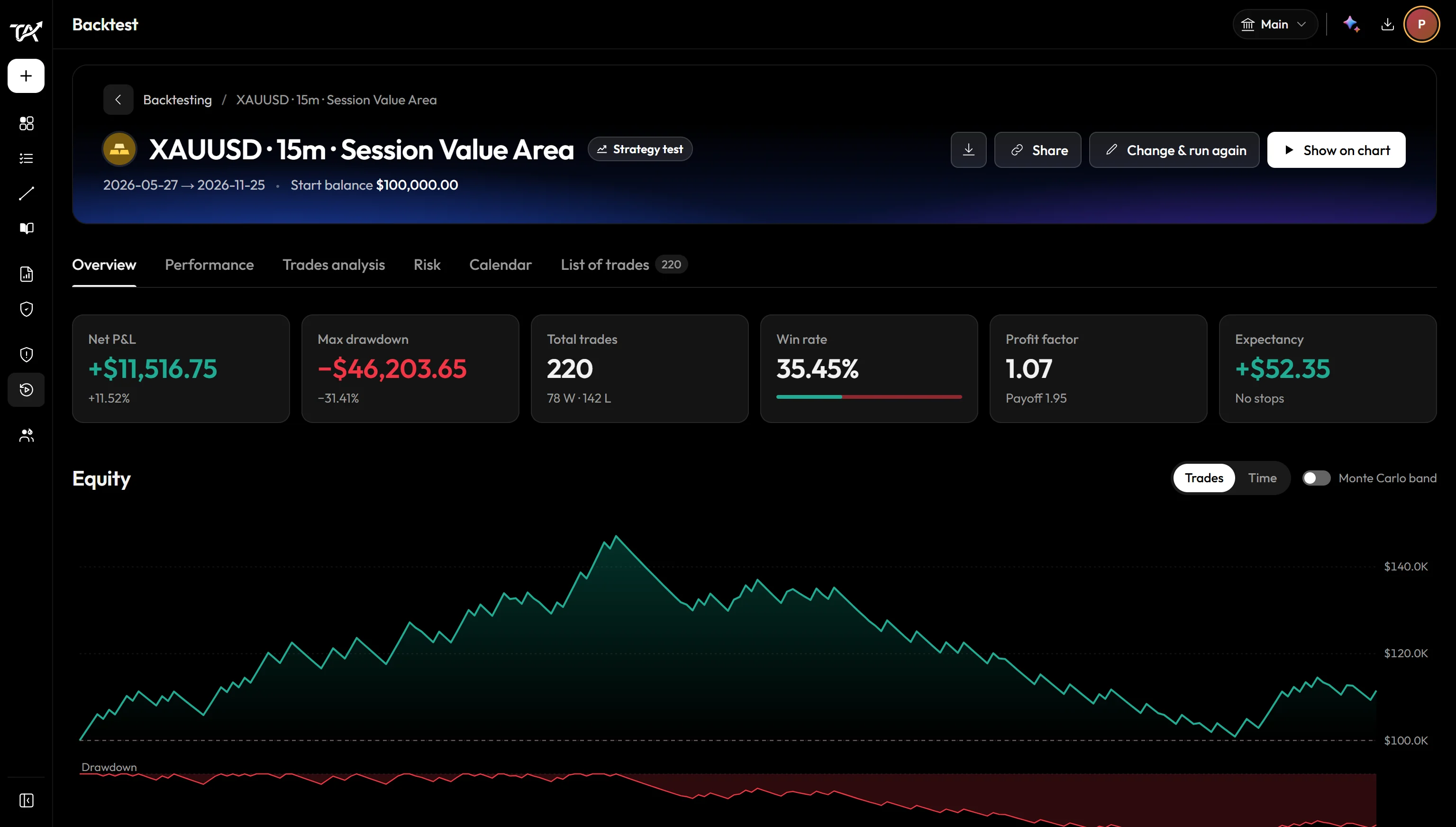
  • Overview: net P&L, maximum drawdown, total trades, win rate, profit factor and expectancy, then the equity curve with its drawdown.
  • Performance, trades analysis, risk and a calendar: long against short, the hour, weekday and session of each trade, streaks, holding times, a Monte Carlo band.
  • The list of trades, and the whole report as a PDF or the trades as CSV.
  • Change & run again: change the conditions or the script's inputs and run the same test again.
The report of the automatic test, XAUUSD · 15m · Session Value Area, 2026-05-27 to 2026-11-25 on $100,000.00: net P&L +$11,516.75 (+11.52%), maximum drawdown −$46,203.65 (−31.41%), 220 trades (78 won, 142 lost), a 35.45% win rate, a profit factor of 1.07 and an expectancy of +$52.35, over the equity curve and its drawdown; Show on chart at the top.
Show on chart

Every trade where it happened, on the candles.

Show on chart opens the test on a chart of its own — no order ticket, only what the strategy did.

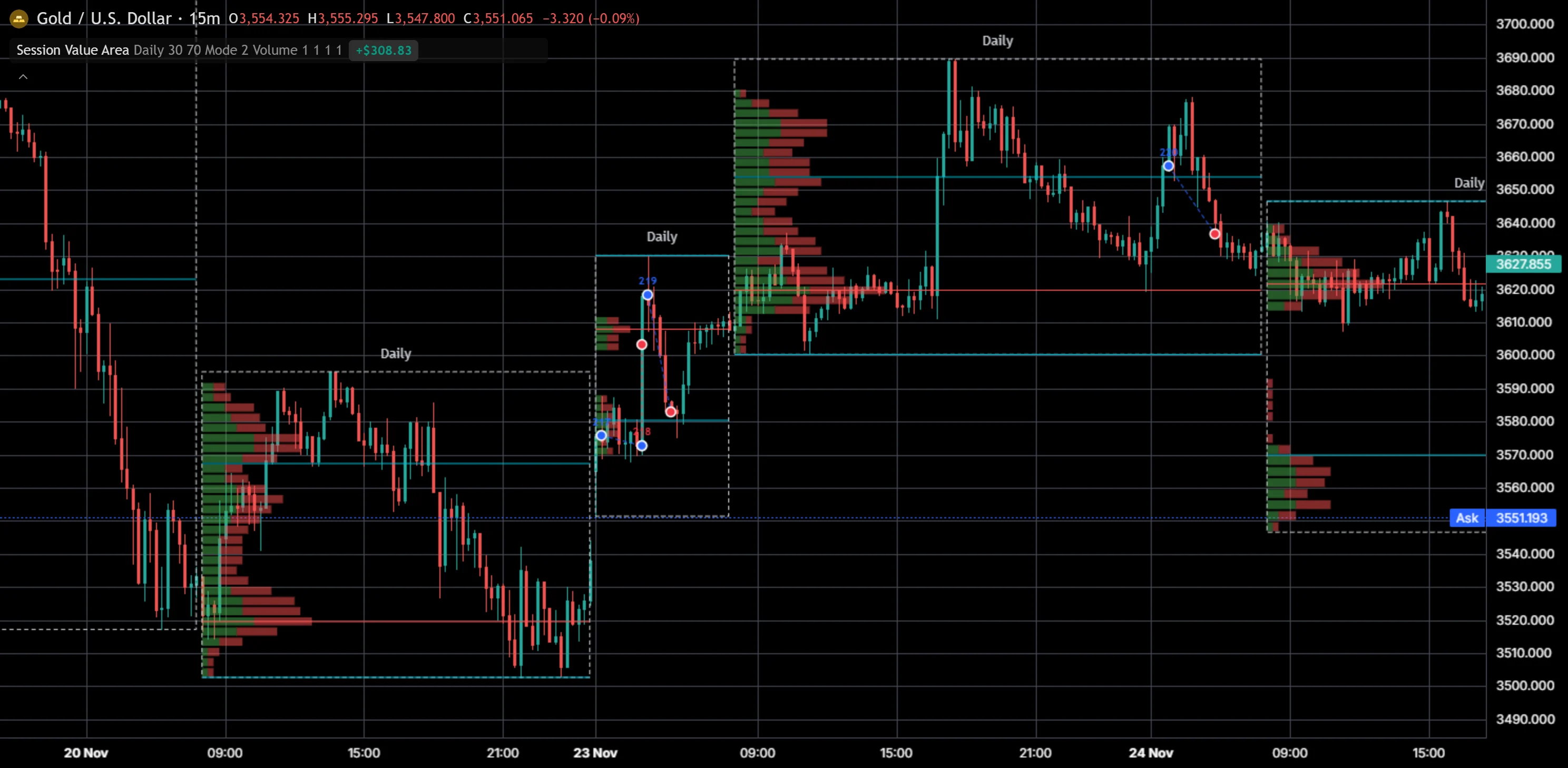
  • A dot at each entry and exit, the exit green or red by its result, and a dashed line between them — blue for a buy, red for a sell.
  • Each trade numbered as in the list of positions; point at a dot for its side, price, time and result, and pick a trade in the list for the chart to frame it, the others dimmed.
  • The strategy's own lines and drawings stay on the chart, like the sessions and value areas here.
Gold on 15-minute candles after an automatic test of the Session Value Area strategy: each day's session boxed with its volume profile and value area, and the strategy's trades on the candles — a blue dot at each entry, the exit red or green by its result, a dashed line between them, each trade numbered as in the list.
Prop firm challenge

Or put the strategy through a prop firm's challenge.

Beside Strategy test is Prop firm challenge: the same strategy and risk, played on a firm's own rules — FTMO's, FundedNext's or another's — to see how often it would pass.

  • Every rule checked as the firm checks it, to the minute wherever a limit is close, stage after stage.
  • Started again every week of the period, for a pass rate instead of one lucky run.

See the Auto Test

Specifications

What you can test9 ready strategies, the no-code Strategy Builder, the signals of a built-in indicator or of your own script, Pine Script® v5 and v6 strategy() scripts
Symbols762: forex, metals, indices, commodities, stocks, crypto and CME futures
Timeframes1, 5, 15 and 30 minutes, 1 and 4 hours
HistoryThe last 3 months, 6 months, 1 year or 3 years, or a custom range from 1 January 2010 to yesterday
Position sizeLots, % of equity per order, risk per trade (% of the account at the stop), or the strategy's own
Stop lossThe strategy's own, % of the price, a multiple of the ATR (14), pips or points
Take profitThe strategy's own, risk : reward (R) or % of the price
Limits for the day% daily loss (of the day's opening balance), trades a day, losses in a row
Starting balance$100,000
ResultA backtest session: the full report, the list of trades, Show on chart, a PDF report and a CSV of the trades
WhereBacktest › Automatic › Strategy test

What each plan includes

The Automatic Backtest is part of the backtester: on Pro and Elite, and in full during the 7-day trial. CME futures need Elite.

FeatureFreeProElite
Backtest sessionsNo backtesting (7-day trial: unlimited)Unlimited backtest sessionsUnlimited backtest sessions
Backtest symbols10 main symbols750 symbols762 symbols, CME futures included
Prop challenge simulatorNot includedIncludedIncluded

Compare every plan

What it does not do

  • The past is not a promise. A test shows how a strategy would have traded these candles; markets change, and a good report is not a forecast.
  • Fills come from candles. Orders fill at the prices the candles reached, not at a broker's live quotes: a real account's spread, slippage and swap can change the result.
  • Only a strategy trades. A Pine Script® indicator places no orders on its own — choose Indicator signals to trade its signals instead.
  • It is not TradingView. Pine Script® is TradingView's language; TradeAssay runs it on its own engine and is not affiliated with TradingView.
Questions

About the Automatic Backtest.

What is an automatic backtest?

A backtest that trades by itself. You give it a symbol, a strategy and your risk rules, and it plays every candle of the period, opening and closing trades as the strategy says — no clicking through the chart. In TradeAssay it ends in the backtester's full report and every trade on the chart.

How is it different from the Strategy Tester?

The Strategy Tester sits under a backtest chart and updates as you build. The Automatic Backtest is a guided test from the first step to the result — symbol, strategy, period and your own money management — that runs by itself, is kept as a session with the full report, and can be played as a prop firm challenge too.

Do I need to know how to code?

No. Pick a ready strategy, build one from conditions, or let it read an indicator's buy and sell signals. Pine Script® is only one of the four ways.

Can I test my TradingView strategy?

Paste its strategy() code. Pine Script® v5 and v6 scripts run as they are on TradeAssay's own engine, and a line it cannot run is named with its line number.

Can I see each trade?

Yes. Show on chart opens the test on the candles: every entry and exit marked and numbered as in the list of trades, with the strategy's own lines drawn. The list has each trade's price, size and result.

How far back can it test?

Up to 3 years in one click, or any dates from 1 January 2010 to yesterday, as far as the symbol's history goes — forex and gold have minute data since 2003.

Which plan has it?

Pro and Elite, and the 7-day trial in full. CME futures need Elite. The Free plan has no backtesting.

Your next trade deserves a reason.

Bring in your history and see what it says — free, in a few minutes.

Create your free account
Help centre

Answers to what traders ask us most — and a ticket to a person when they aren't enough.

Open help
Write to us

support@tradeassay.com — read by the people who build the app.

Send an email
Learn

Long reads on sample size, R and prop-firm rules, each with a calculator.

Start reading