


The best free trading journals in 2026, and what "free" really includes
Nine free plans side by side, the journals that only offer a trial, and how to start one free with your MetaTrader history in three minutes.

The short answer
- Free, with no limits on tradesTradeAssay: no card, no expiry, MetaTrader report import, analysis in R, and 7 days of Pro to try backtesting.
- Free automatic MetaTrader syncTraderWaves (3 accounts) and UltraTrader (one broker) include it on their free plans.
- The cheapest automatic syncTradeAssay Pro at $9.99 a month: MetaTrader cloud sync with the investor password, 24 hours a day, your computer off.
Who wrote this. TradeAssay makes one of the journals on this page. Every other journal's plan, limit and price below comes from its own pricing or home page, read on 21 November 2026, and where another journal's free plan does something ours doesn't, we say so. Plans change; check the vendor's page before you sign up.
Free plan or free trial? The difference that matters
A free plan stays free: you can keep a journal on it for years. A free trial is a paid plan with a countdown, often with a card on file that is charged when it ends. Both are useful, but only the first is a free trading journal. When you compare, look at four things:
- A cap on trades or entries. Some free plans stop at a number of executions or journal entries a month.
- How trades get in. Typing every trade by hand, importing a file, or automatic sync from your platform.
- Which markets. A free plan limited to stocks is no use for forex, gold or a prop-firm challenge.
- What you lose when you stop. Whether your trades stay, and whether you can export them.
Nine free trading journals side by side
Every plan below is free forever, not a trial. Read on each company's own pricing or home page on 21 November 2026; "not stated" means its page didn't say.
| Journal | What the free plan allows | MetaTrader on the free plan | Markets | Paid from |
|---|---|---|---|---|
| TradeAssay | Unlimited trades, 1 trading account, full journal, overview and core analysis | Import your MT4 or MT5 report; cloud sync on Pro | Forex, gold, indices, futures, crypto, stocks | $9.99/mo · $79.99/yr |
| TraderWaves | 3 trading accounts, unlimited journal entries; no drawdown analytics, backtesting or CSV export | Auto import; MetaTrader 4 and 5 among its platforms | Not stated per plan | $19.99/mo billed yearly |
| TradesViz | 3,000 executions a month, 1 account, P&L charts | Stocks only on free, so forex and CFDs need Pro | Stocks only | $19.99/mo · $14.99/mo yearly |
| UltraTrader | One broker sync, core journaling, 1 portfolio | MetaTrader 4 and 5 among its brokers, read-only | MetaTrader, cTrader, crypto exchanges | $20/mo · $15/mo yearly |
| StonkJournal | Unlimited trades and accounts, manual entry only | No import on free; broker sync "on the roadmap" | Stocks, options, futures, forex, crypto | $10/mo |
| FreeTradeJournal | Up to 20 journal entries, 2 accounts, 30 days of analytics | CSV or Excel import | Forex, futures, indices | $12.99/mo · $99.99/yr |
| FX Replay | 2 backtest sessions, 1 indicator; backtesting, not a journal of live trades | No | Not stated | $17.99/mo · $180/yr |
| Myfxbook | Statistics and a verified track record of an account | Investor password, a few updates a day | MetaTrader 4 and 5 accounts | Free |
| Notion templates | 197 free templates you fill in by hand | No | Any | Free |
Myfxbook's page refuses automated reading; its facts are from our comparison of nine journals, checked on 20 November 2026. FX Replay's are from its pricing page, checked on 7 November 2026.
Journals with no free plan
- TradeZella: from $35 a month; its pricing page shows no free plan or trial. The most complete journal for US stocks and futures.
- Edgewonk: $35 a month or $197 a year, with a 14-day refund instead of a free plan.
- TraderSync: a 7-day trial (its page refuses automated reading; the trial is what independent reviews agree on).
- TradeSyncer: a 7-day trial that needs a card, charged on day 7 unless you cancel. Mainly a futures trade copier.
- Tradervue: its pricing page lists only paid plans (Silver $29.95 a month, Gold) with trials, and mentions switching to a free plan without listing what it includes.
The best free trading journal for MetaTrader 5
About 170 people a month search for exactly this. There are three honest answers, depending on what you want free:
- Free automatic sync. TraderWaves syncs MetaTrader on its free plan with up to 3 accounts, and UltraTrader includes one broker sync. If sync is the only thing you need free, start there.
- Free, with deeper analysis and backtesting. TradeAssay imports your MetaTrader 4 or 5 report for free, measures every trade in R, by setup, session and hour, and its 7-day Pro trial lets you backtest on real history. Myfxbook adds a free, verified track record of the same account.
- The cheapest automatic sync that needs nothing installed. TradeAssay Pro, $9.99 a month or $79.99 a year: your MT5 account syncs on TradeAssay's own cloud servers with the read-only investor password, 24 hours a day, with your computer off. Every new account gets 7 days of Pro automatically, cloud sync for one account included, so you can see it work before you pay.

Inside TradeAssay, section by section
A free plan is only worth what the app behind it can do. This is all of TradeAssay, with the plan each part is on, so you know exactly what you get free and what Pro adds.
1. Automatic sync from your broker Pro, and the 7-day trial
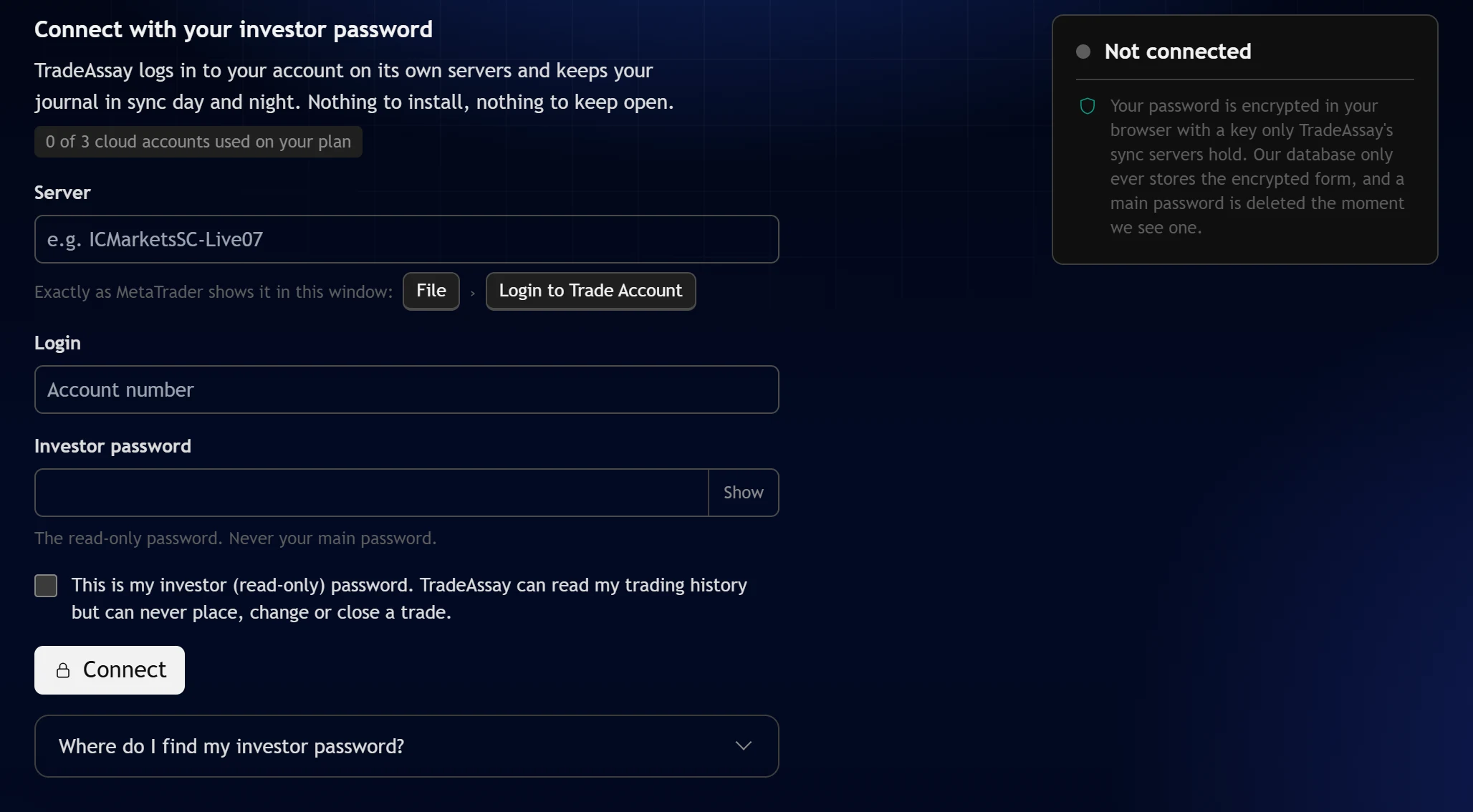
Connect once and TradeAssay's own dedicated cloud servers keep the account connected around the clock: a MetaTrader 5 trade reaches your journal seconds after it closes, with nothing installed, no VPS to rent and your computer off. Every connection is read-only; it can't place, change or close a trade, or move money.
| Platform | How it connects | How fast | History first |
|---|---|---|---|
| MetaTrader 5 | Investor password, on TradeAssay's cloud servers; any broker or prop firm | Seconds after a trade closes, computer off | The last 365 days |
| MetaTrader 4 | TradeAssay's connector inside your own terminal, no password | Seconds, while the terminal runs; catches up when it reopens | What the terminal holds |
| cTrader | A view-only sign-in on Spotware's own page | Within 10 minutes | The account's whole history |
| Bybit, Bybit TR | A read-only API key | Checked every 30 seconds, day and night | Two years on Bybit |
| Binance, Binance TR | A read-only API key | Checked every 30 seconds, day and night | 90 days on Binance |
| Hyperliquid | Just the wallet address; nothing to sign | Around the clock | The account's public record |
| Interactive Brokers | A read-only Flex token | Every 6 hours, or at once with Sync now | As the Flex report lists it |
What arrives with each trade:
- Entry and exit on the account's own clock, so each trade sits on the candle where it happened.
- The net result after commission, swap, fees and funding, with the gross result and each cost beside it.
- From MetaTrader 5: the stop the trade was taken with and the one it closed with, how it closed, the order type, slippage, the spread paid, every fill and tags from your order comment.
- Deposits and withdrawals kept apart from trading, and the broker's own balance at the close of every day; while the app is open, open positions, balance, equity and margin refresh every couple of seconds.
- A trade already in the journal is never overwritten: your notes, tags and playbook stay as you left them. If a sync stops, one e-mail says why and how to fix it.
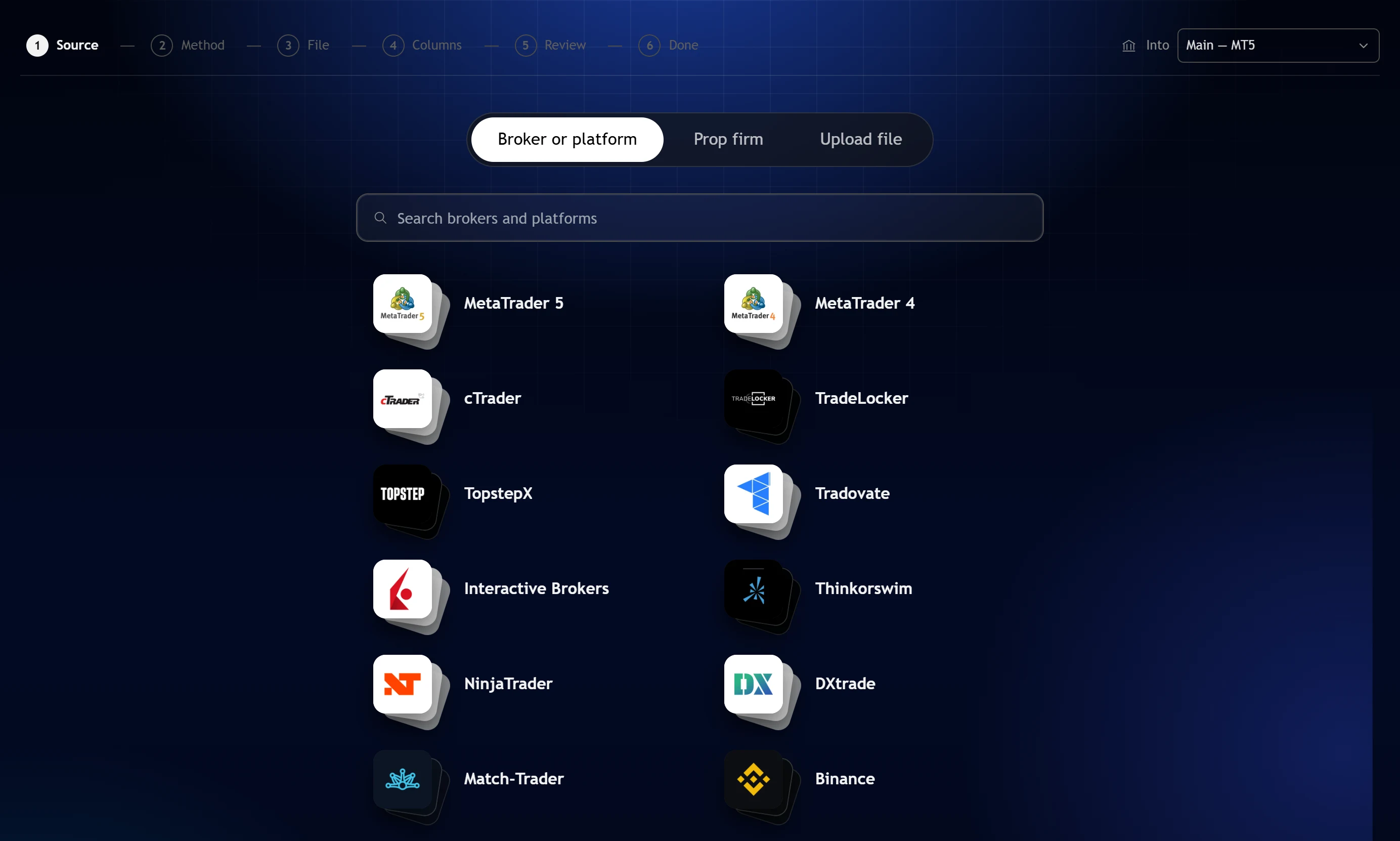
Any other platform imports from the statement it already exports, on every plan: CSV, Excel, HTML or XML from 40+ platforms, in any language, every row checked before it is saved.
2. The journal Free
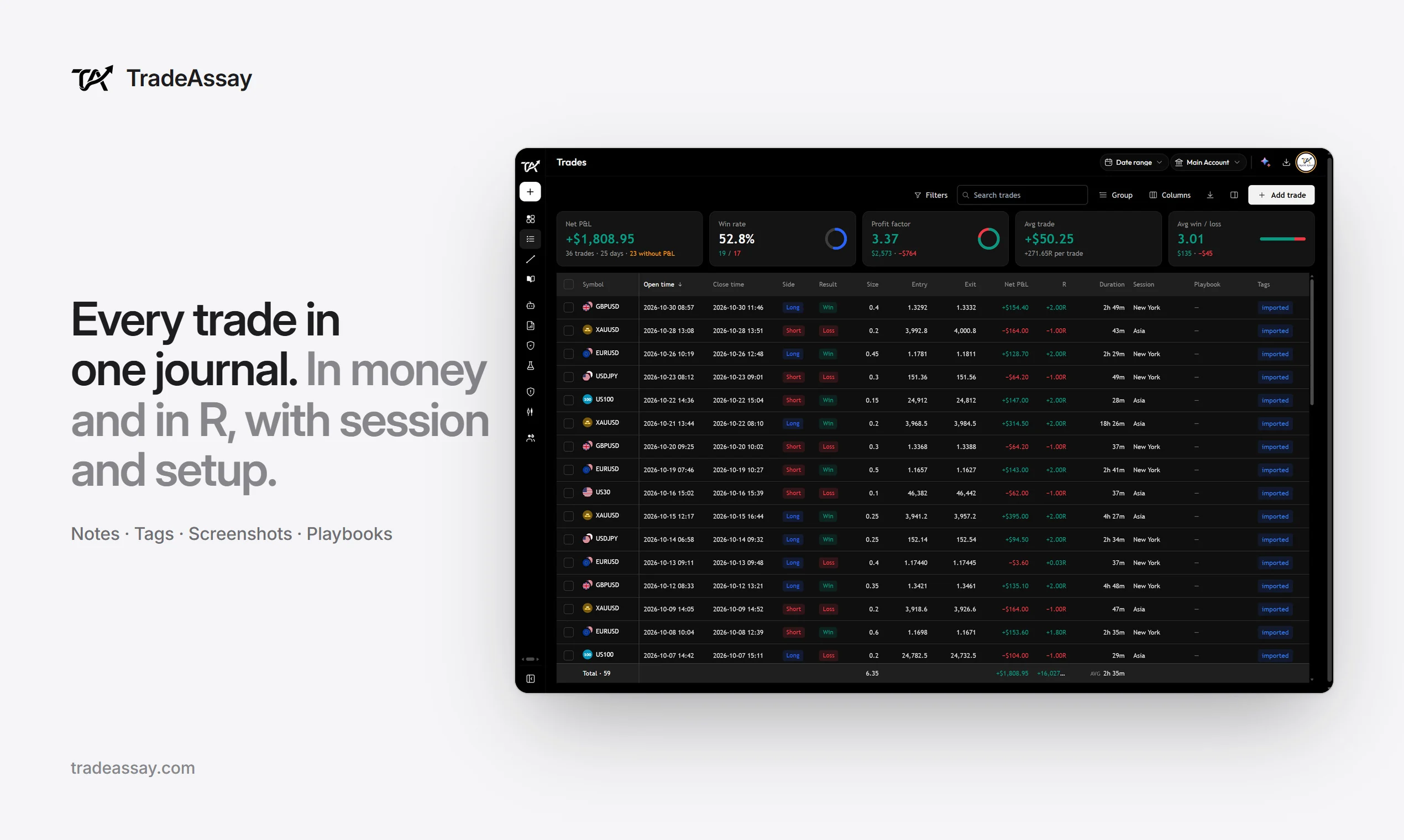
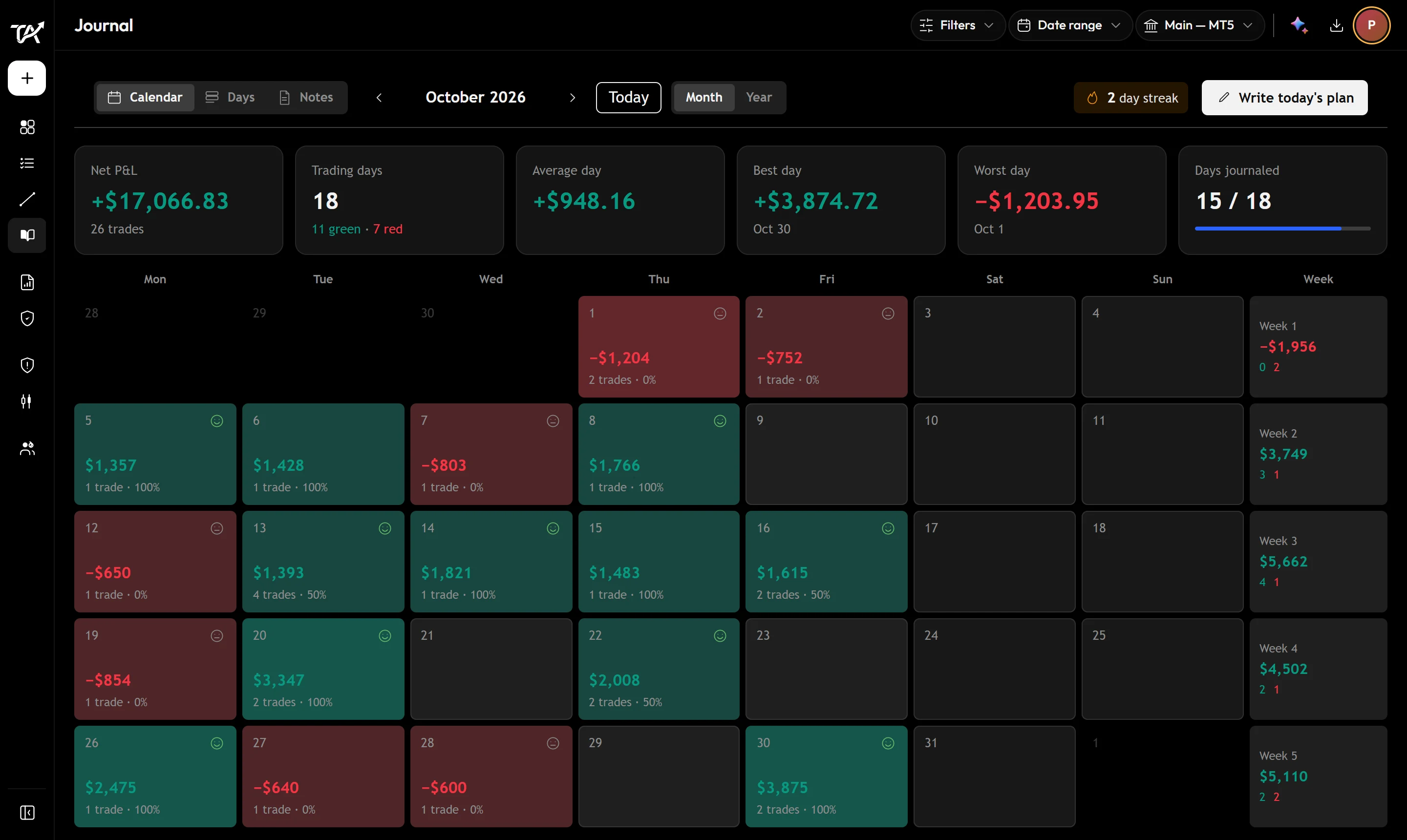
Every trade in one log, in money and in R, with its session, setup, notes, tags, screenshots and playbook; a calendar with every day coloured by its result; and a page for each day to write what happened.

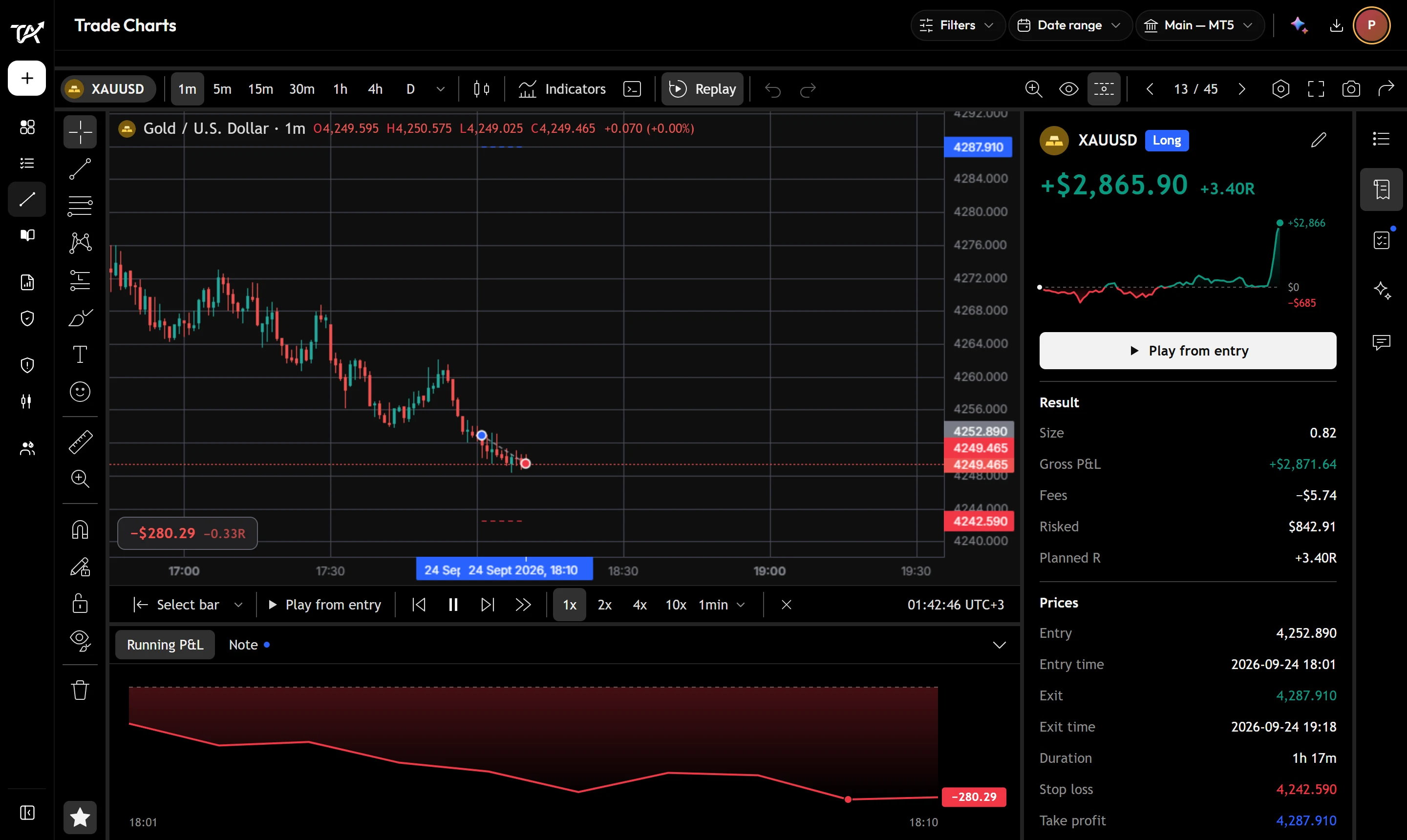
3. Every trade back on its chart Pro
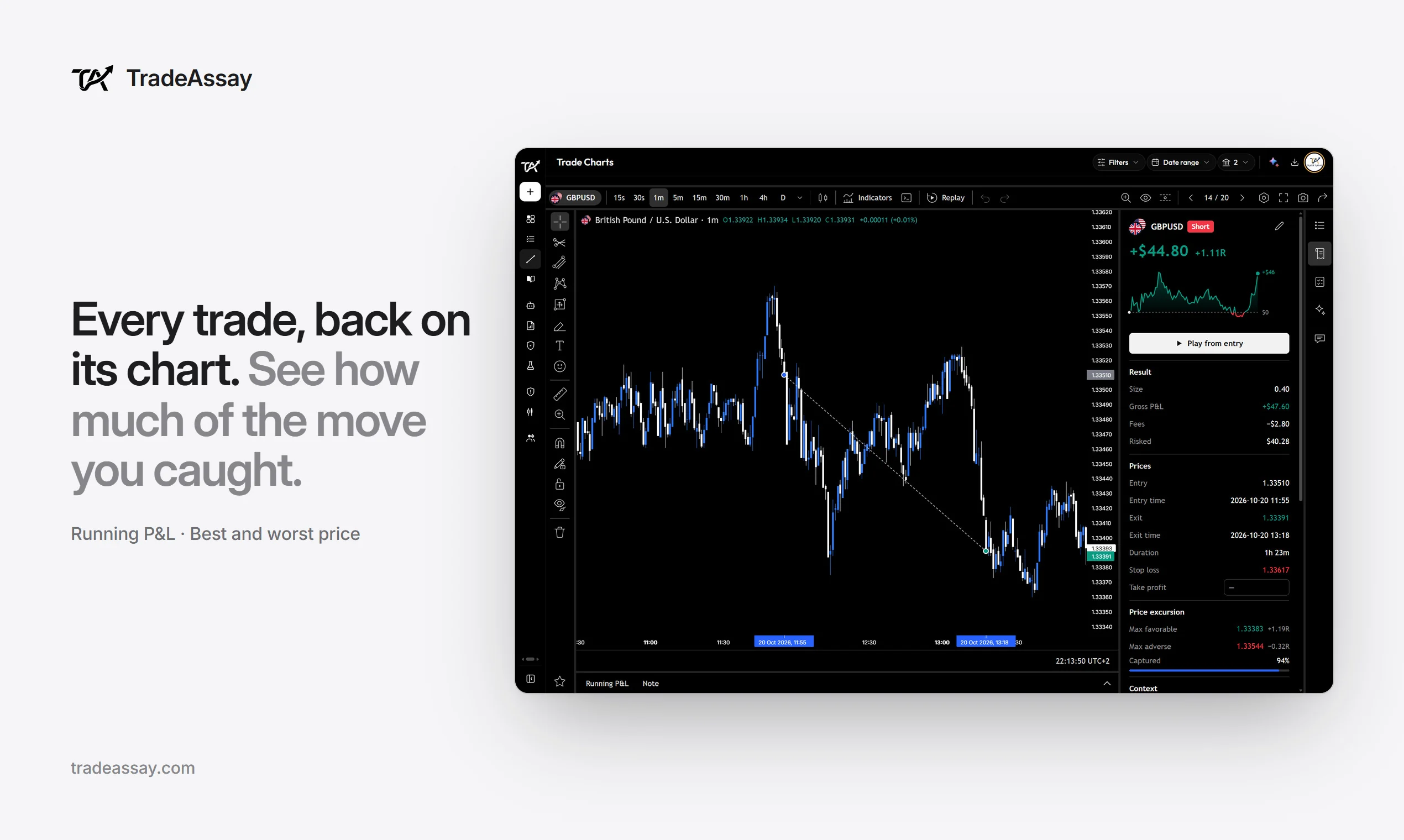
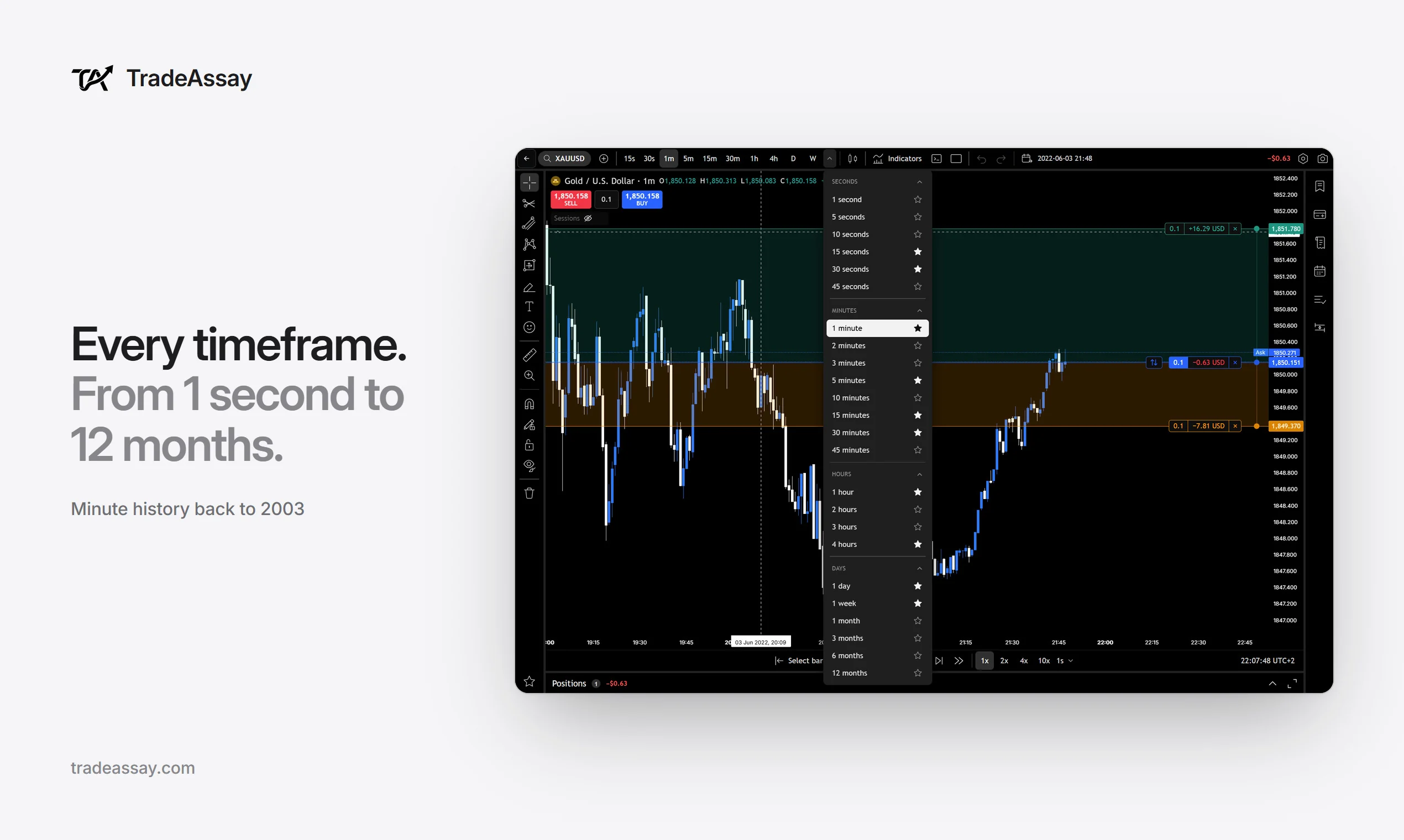
Open a trade and it comes back on the chart where it happened, with your entry, stop, target and exit drawn in place. Replay it from the fill, candle by candle, with the P&L running in money and in R and the future hidden until you play it, on 24 timeframes from 1 second to 12 months. Beside the chart: how far the trade went for you and against you, how much of the move you kept, what the trade would have made held to its target, and trades like it at the same hour, on the same symbol or with the same playbook. Under it, a note you can write or speak, and the AI reads the trade (Pro: 500 messages a month).
4. Reports and analysis Free, except Periods
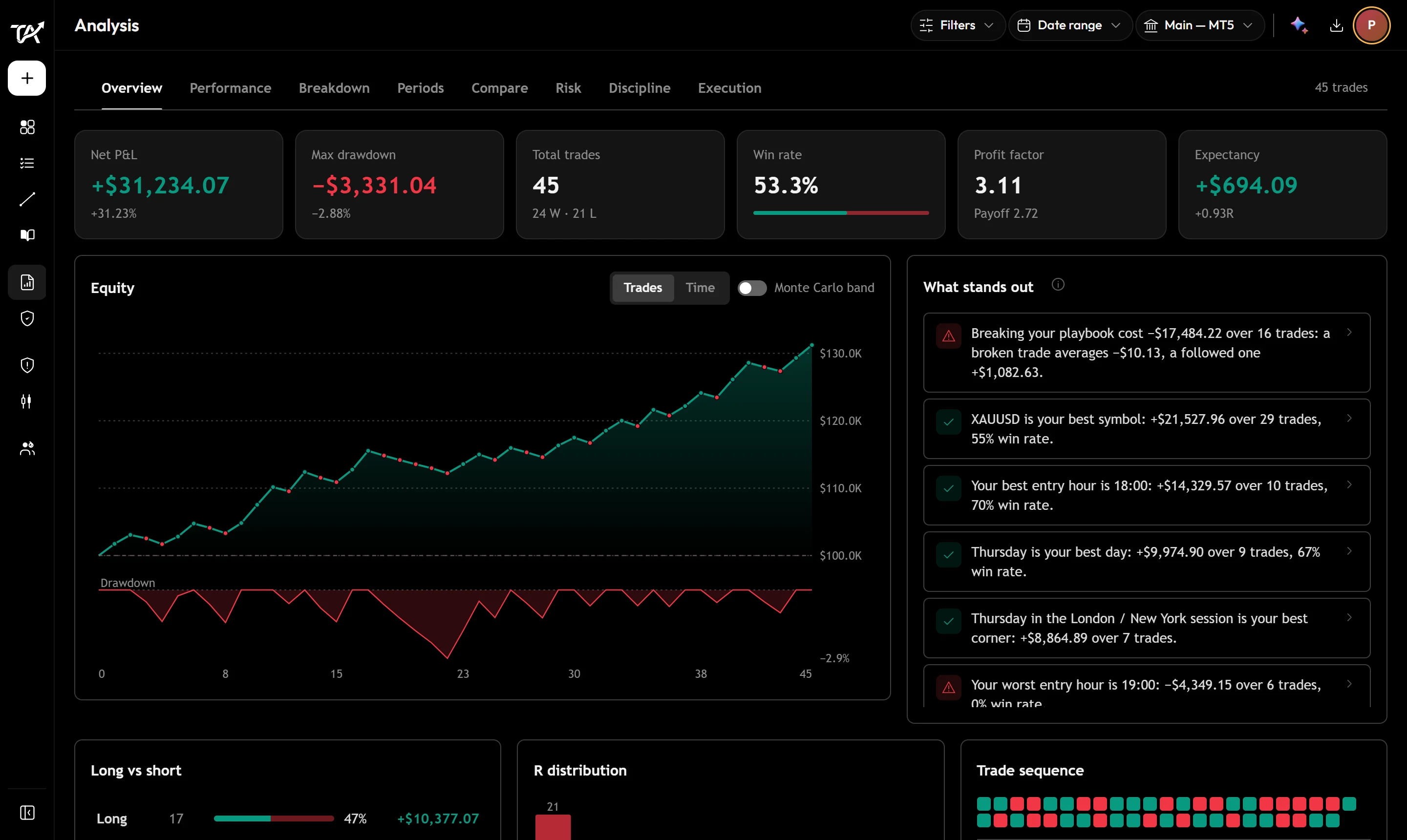
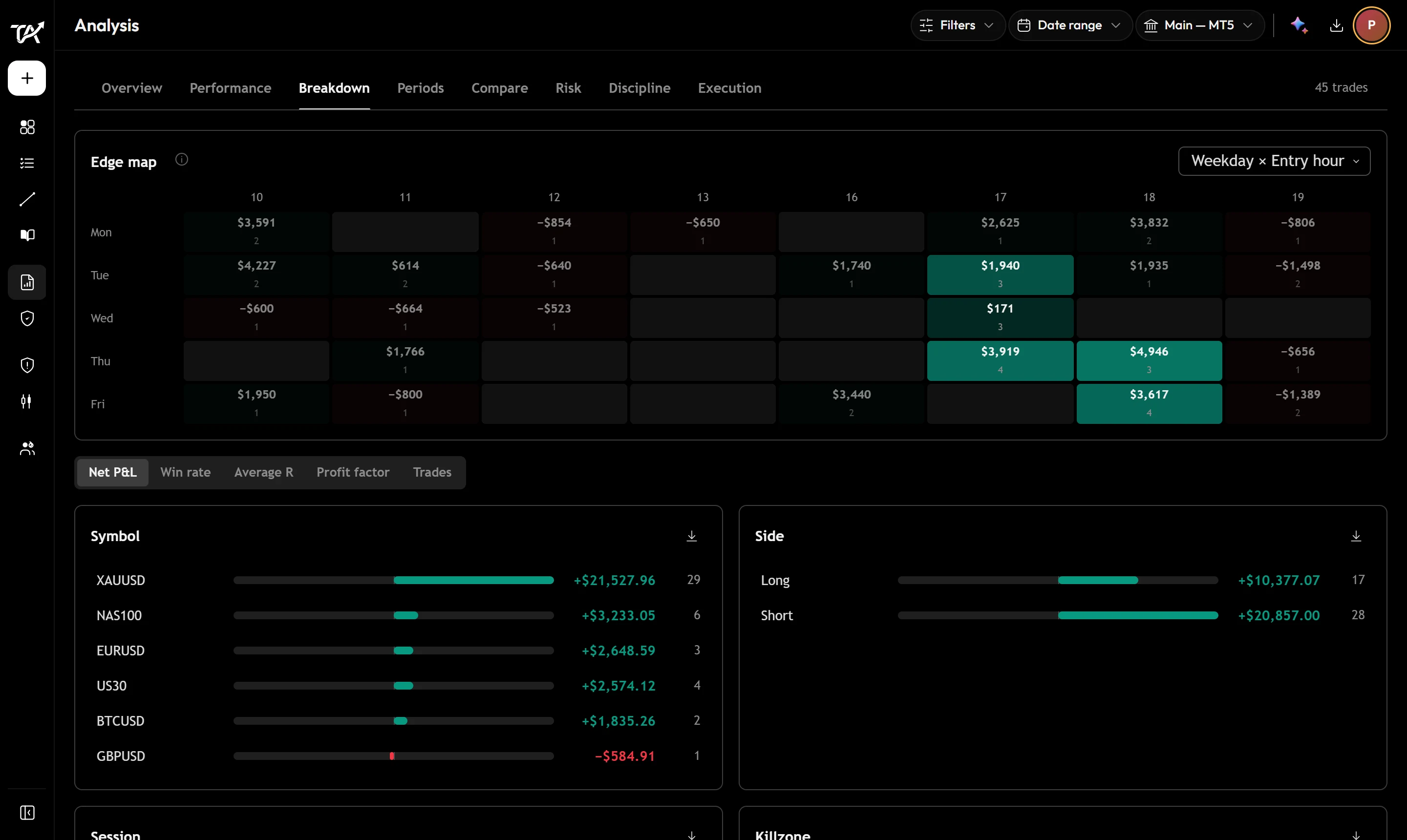
Analysis answers one question: what actually pays you. Every figure is net of costs, in money and in R, opens the trades it was built on, and says how many trades it stands on. An account, a date range and any filters at the top apply to every view:
| View | What it shows |
|---|---|
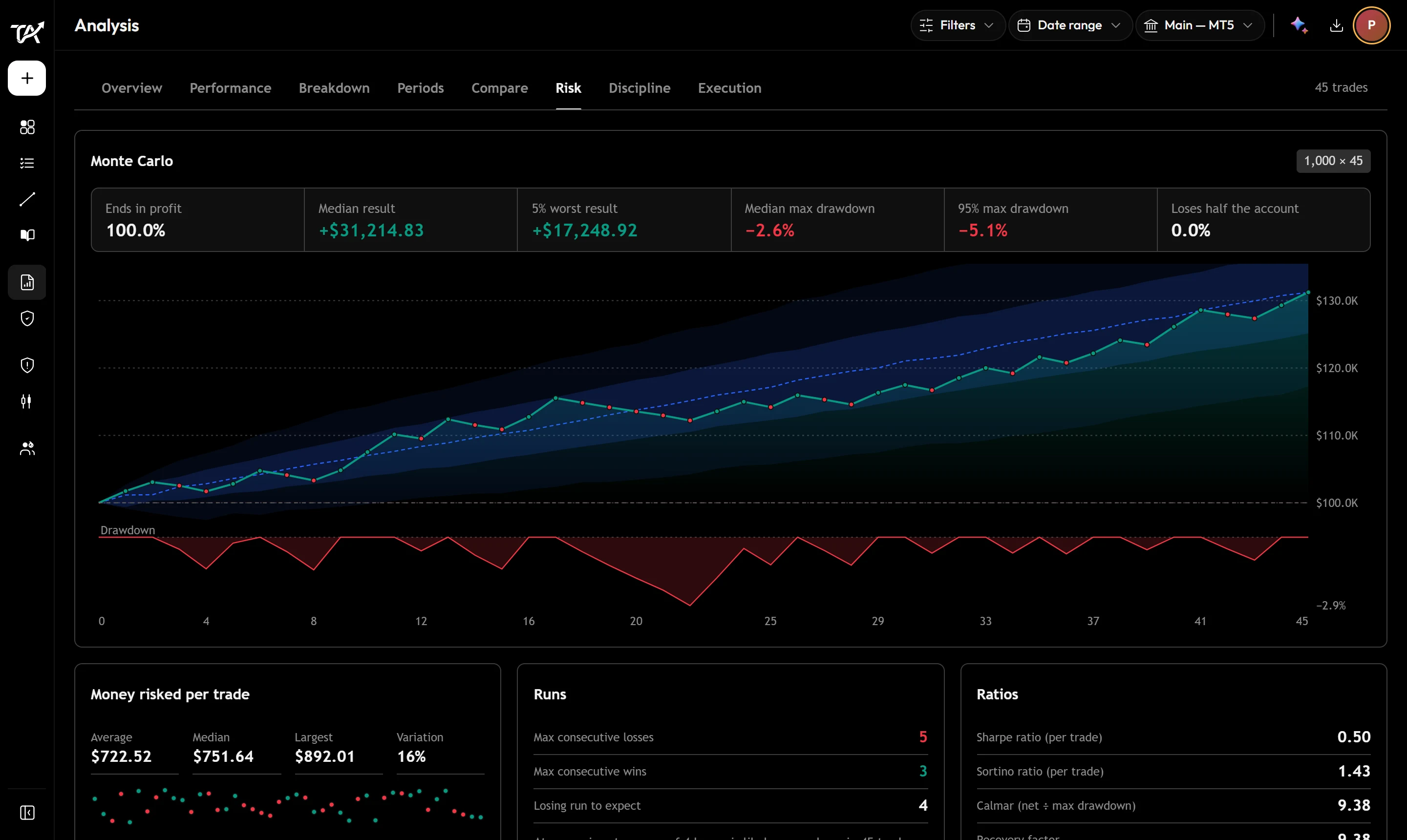
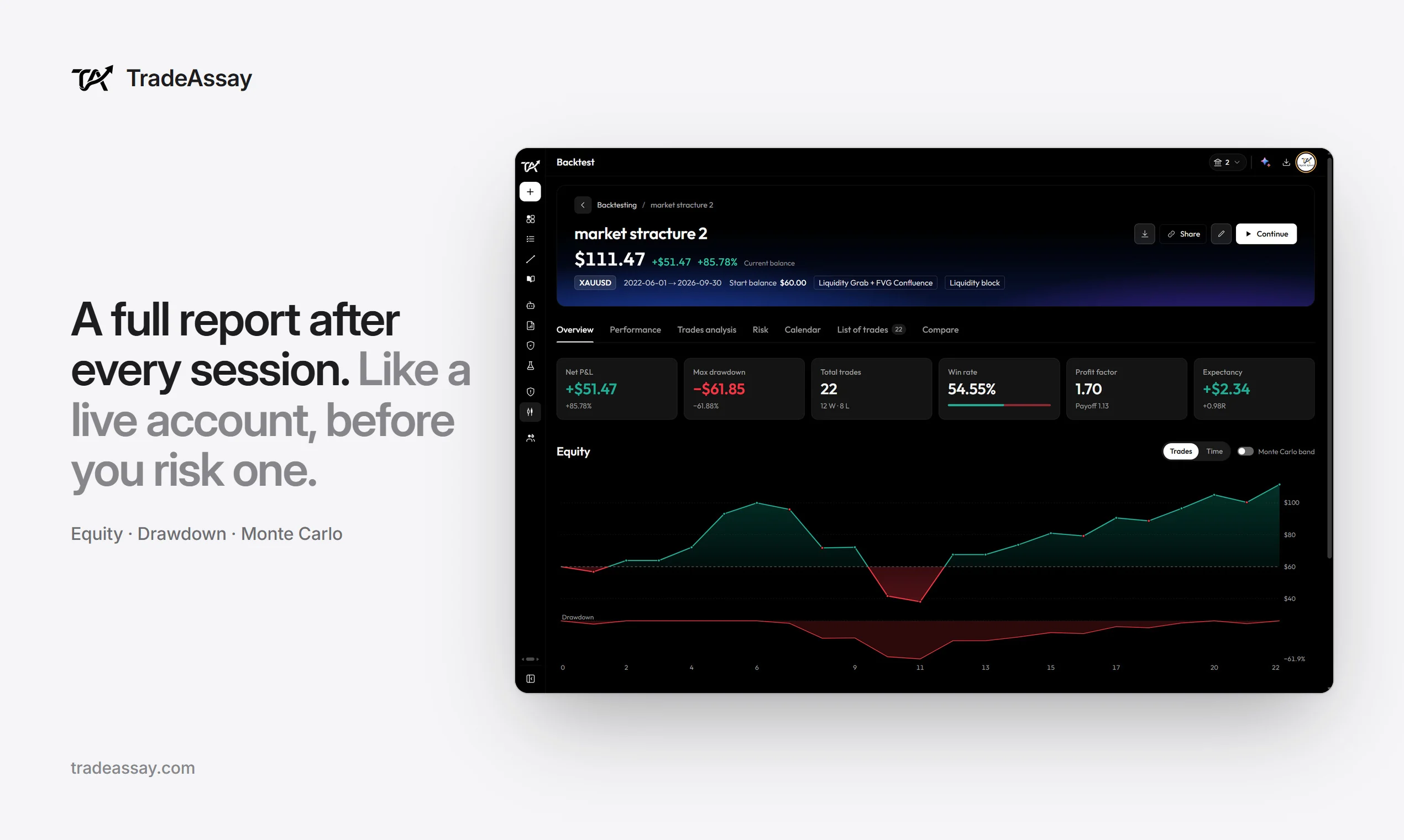
| Overview | Net P&L, maximum drawdown, trades, win rate, profit factor and expectancy; the equity curve with its drawdown; your best and worst symbol, hour, day and session in a sentence each; a Monte Carlo band |
| Performance | Long against short, line by line: net, gross, profit factor, expectancy in money and R, averages, extremes, holding times; your last 20 trades against the whole book |
| Breakdown | The edge map, weekday against entry hour, and 19 ways to split the same trades: symbol, side, session, killzone, hold time, playbook, setup, mistake, emotion and more |
| Periods | Week by week, month by month, year by year, with each period's best and worst day (Pro) |
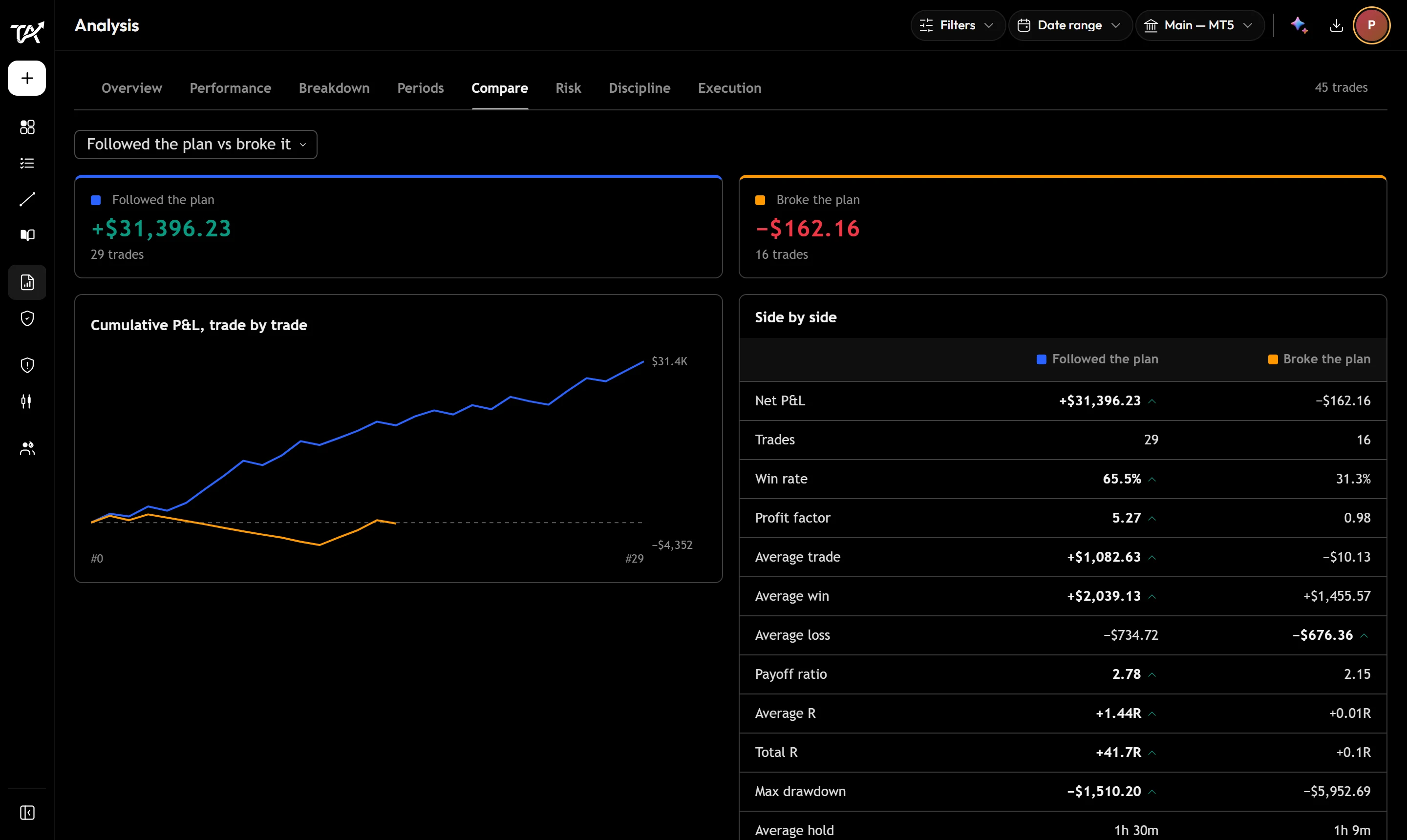
| Compare | Any two sets of trades side by side: the plan followed against broken, this month against last, one playbook against another; 14 figures each |
| Risk | A thousand reshuffles of your own trades, the losing streak to plan for, every drawdown and its recovery; Sharpe, Sortino, Calmar and recovery factor |
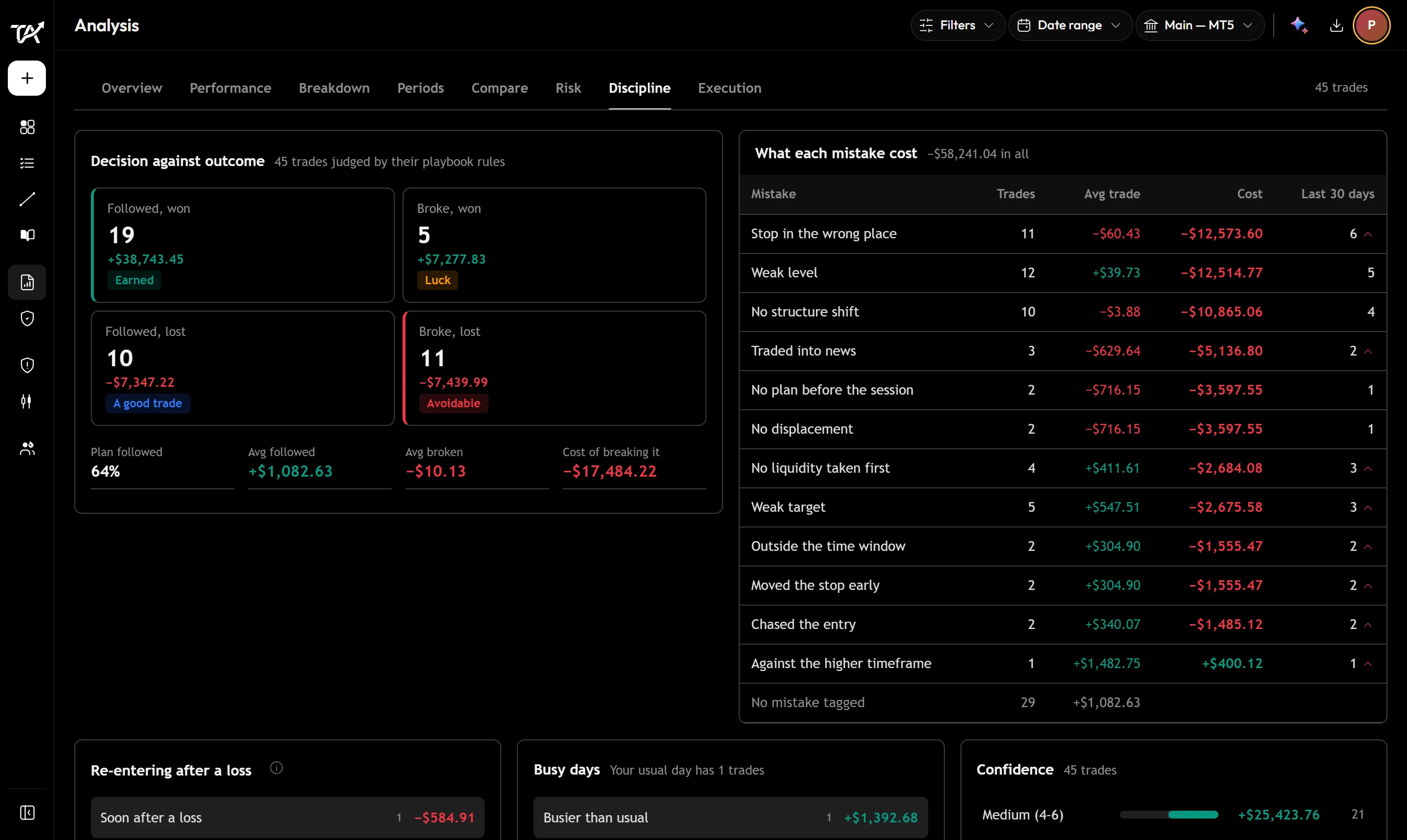
| Discipline | Followed and won, followed and lost, broke the rules and won, broke them and lost; what each mistake has cost; trades taken soon after a loss |
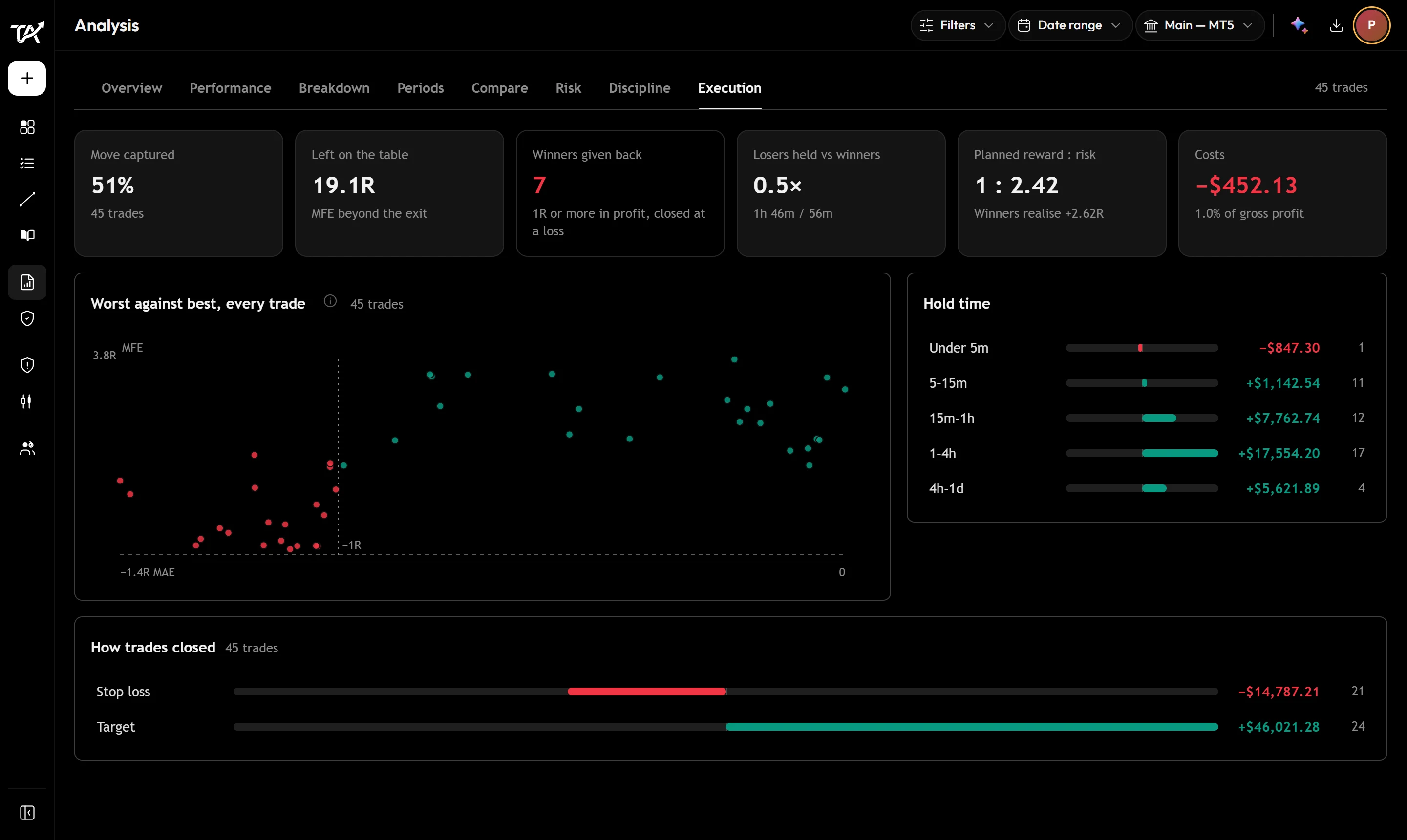
| Execution | How much of the move you took home, R left on the table, winners given back, how trades closed, results by holding time |

5. Playbooks and strategy rules Free
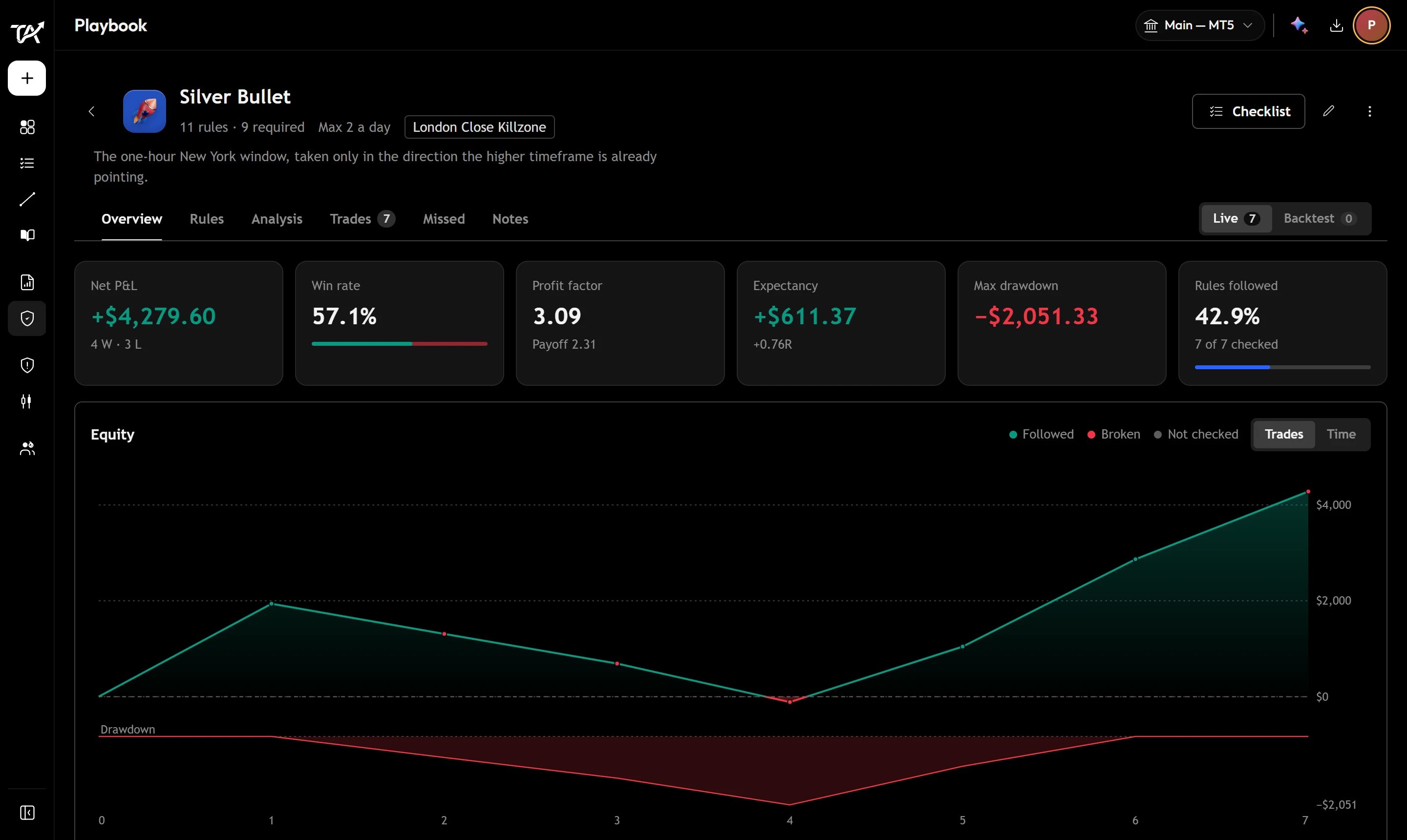
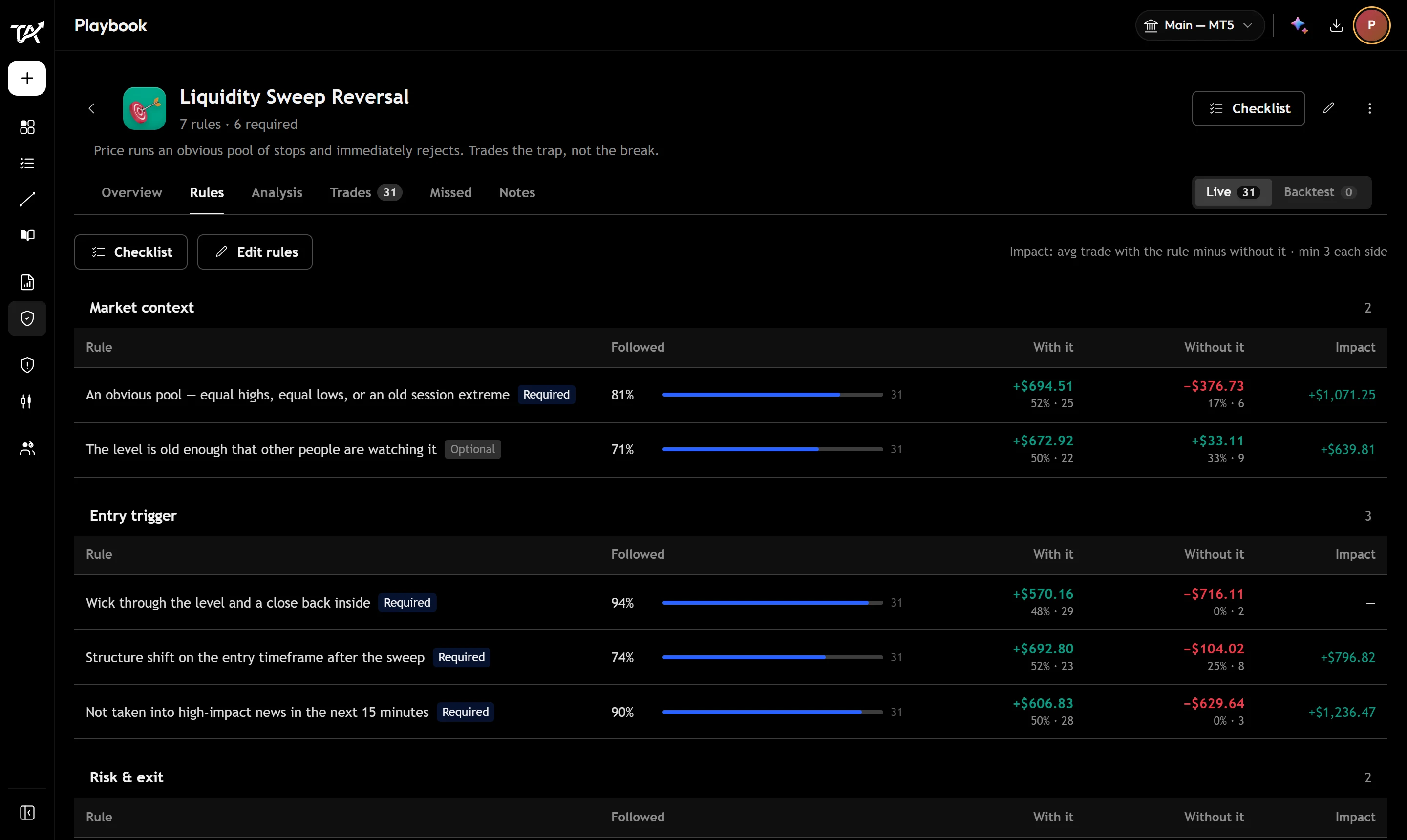
Write each setup as a checklist of rules, required or optional, with the sessions it is allowed in and the most trades a day; tick it in the trade form before you know the outcome. Your results then split in two: what you made when you followed the rules and what breaking them cost you, to the dollar, and each rule gets its own line, so you can see which one carries the setup. Ten templates to start from, Silver Bullet to funded-account discipline, and backtest results kept beside live ones for the same rules.
6. The backtester Pro; 2 sessions free
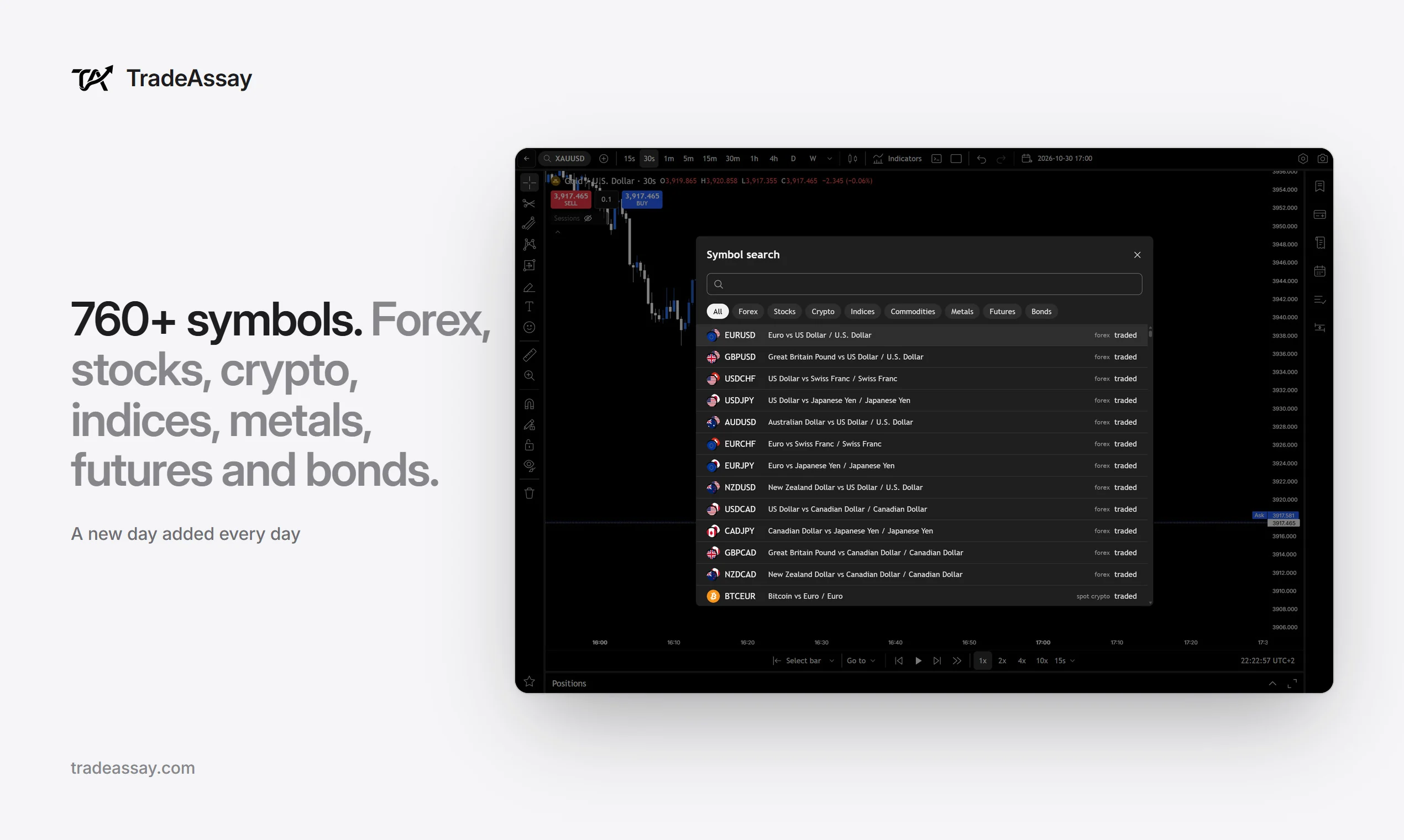
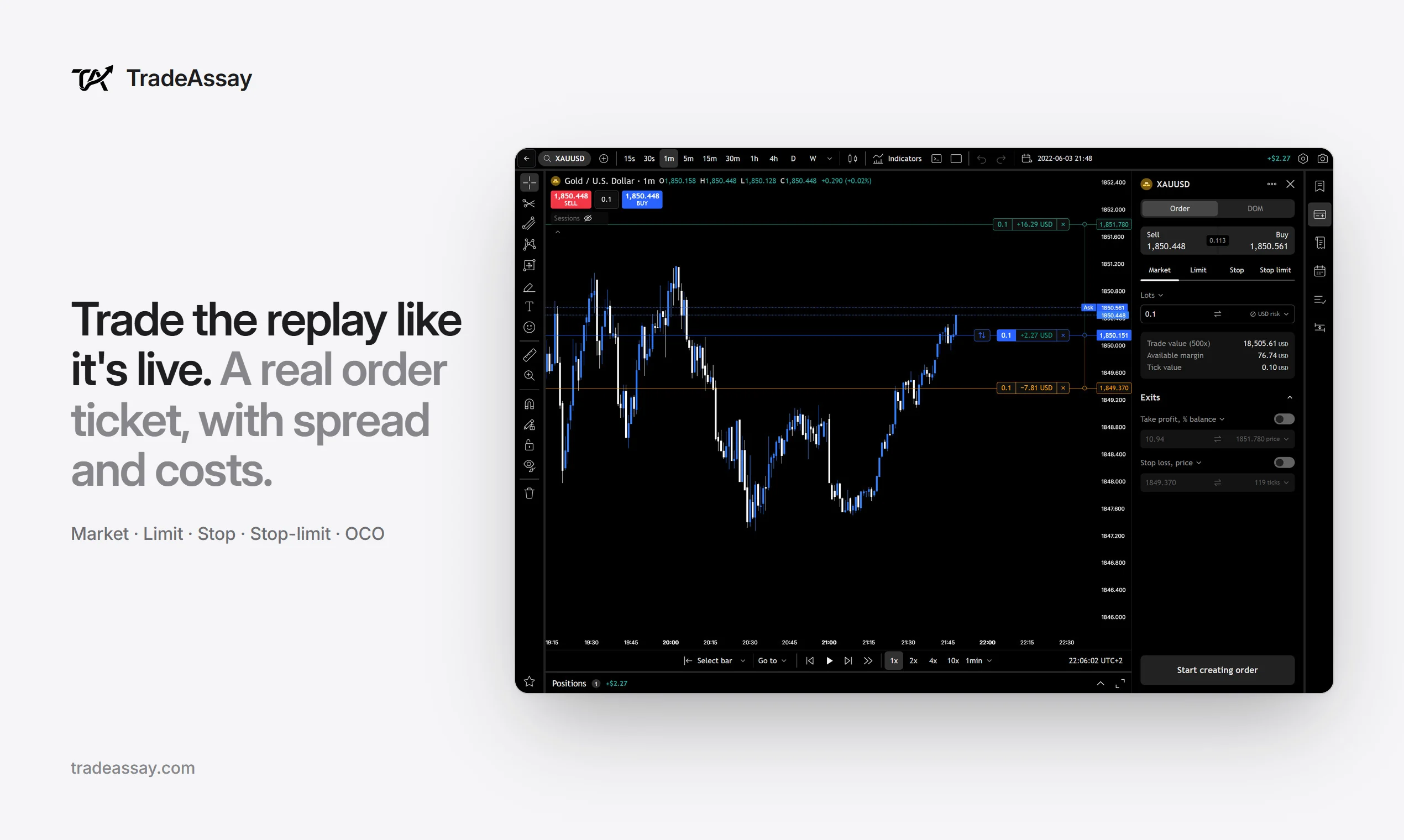
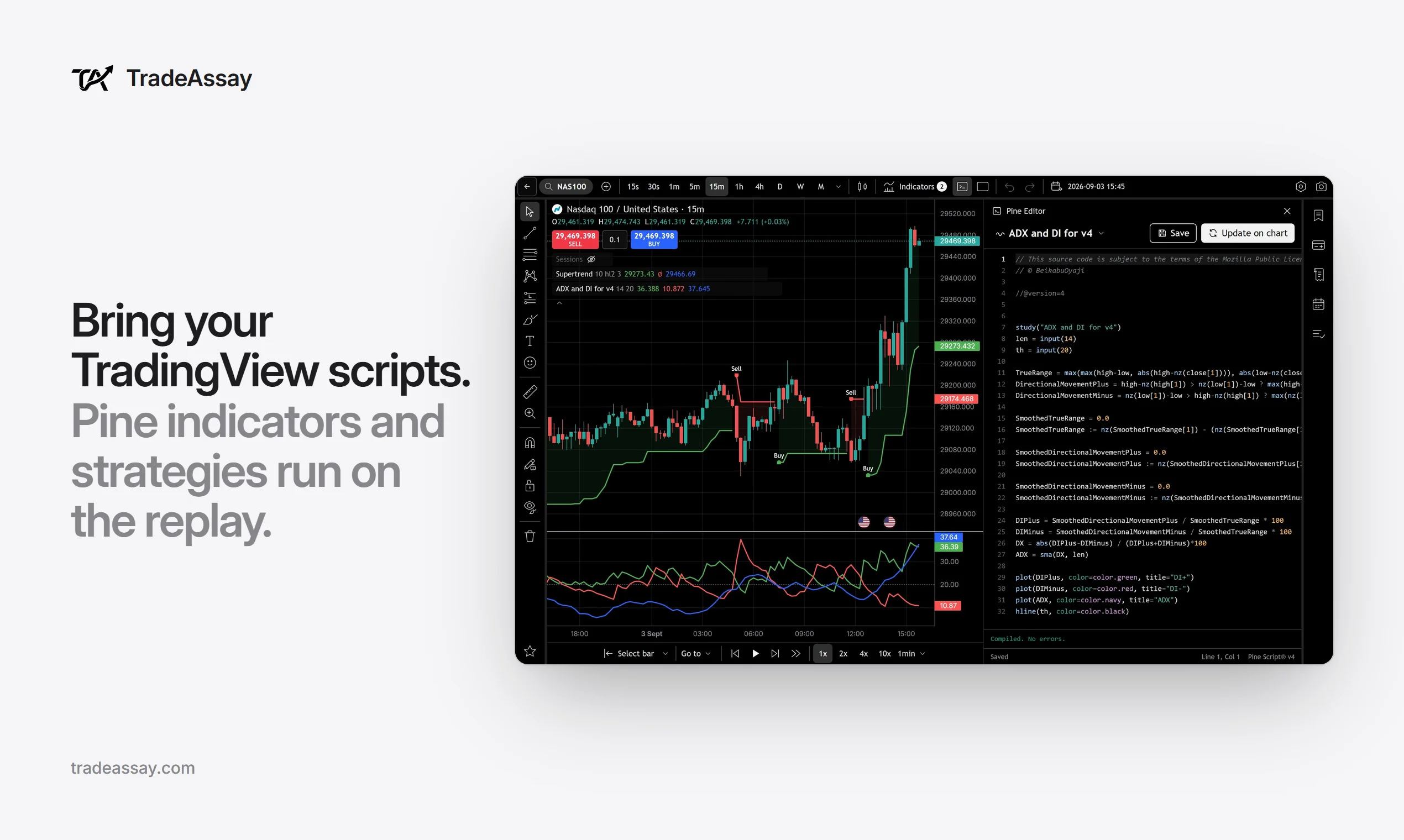
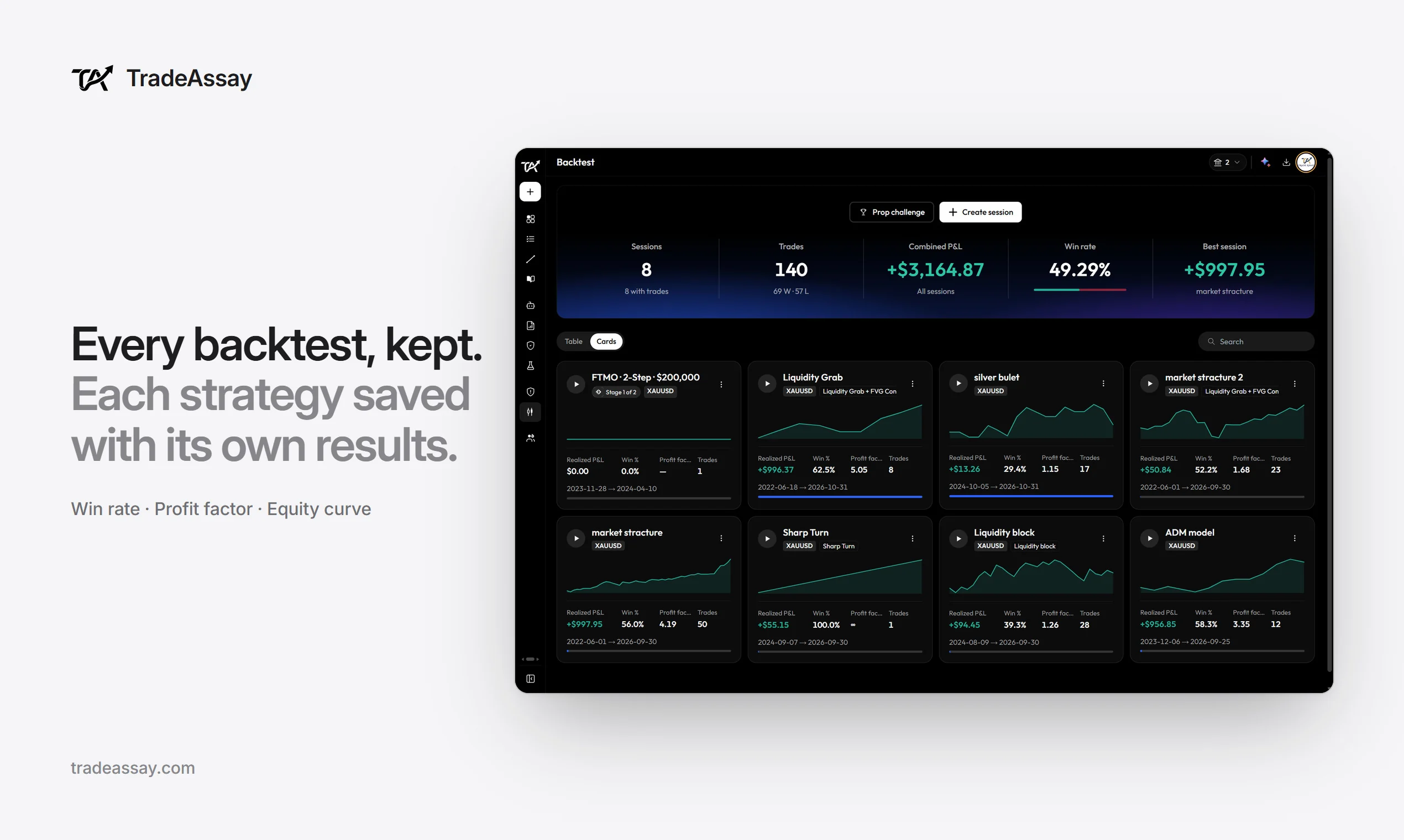
Trade the past bar by bar with the future removed, on 762 symbols of real historical prices: forex, metals, indices, commodities, bonds, stocks, 12 CME futures and 431 crypto pairs. Forex and gold come in one-minute bars since 2003, and a new day is added after every close. 24 timeframes from 1 second to 12 months (seconds on Elite), up to 16 charts on the same replayed minute, and a real order ticket: market, limit, stop and stop-limit orders, OCO, a trailing stop and up to 3 targets, bought at the ask and sold at the bid with the spread and commission paid. Your TradingView Pine Script indicators and strategies run on the replay, and every session gets its own journal and report.

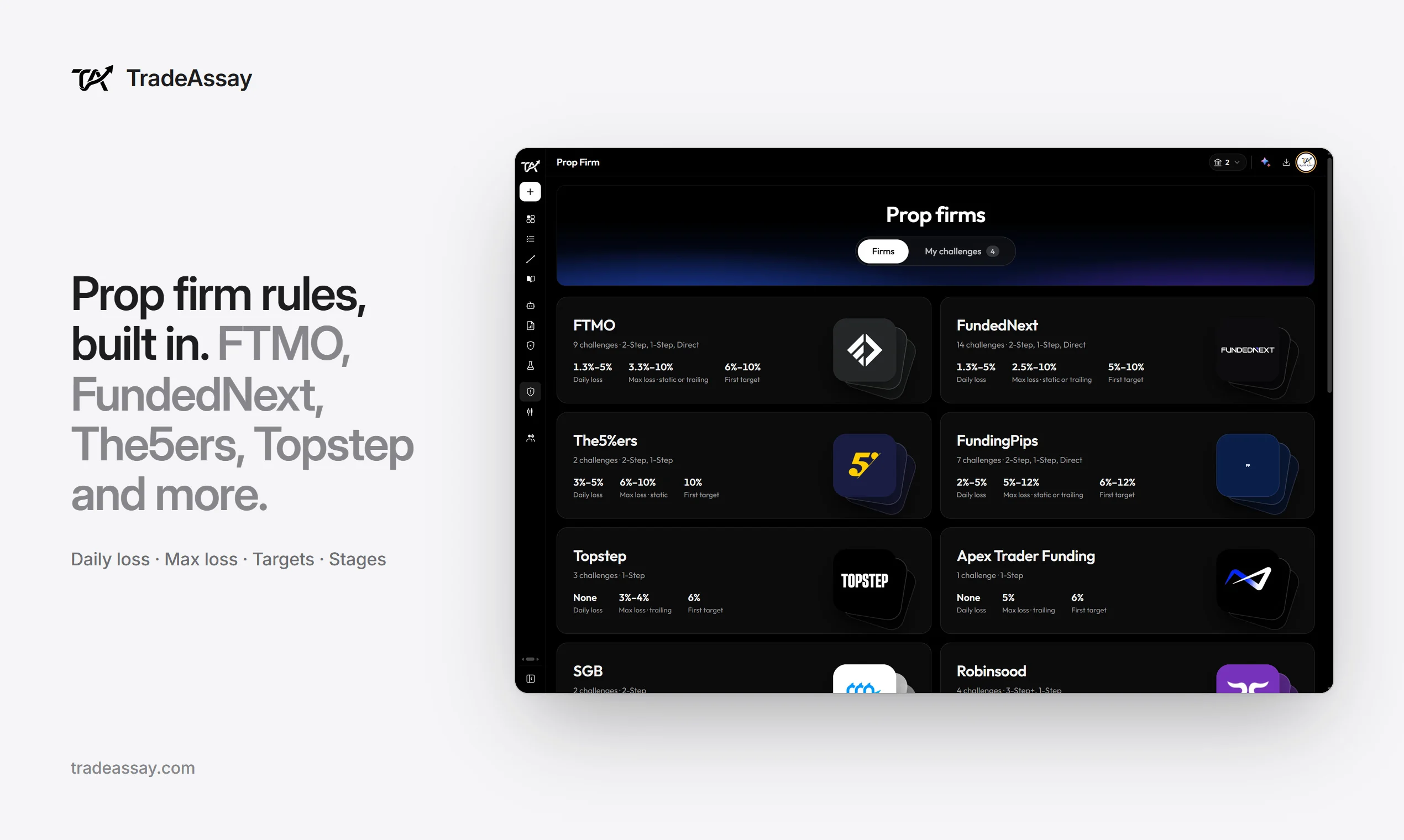
7. Prop-firm challenges Pro
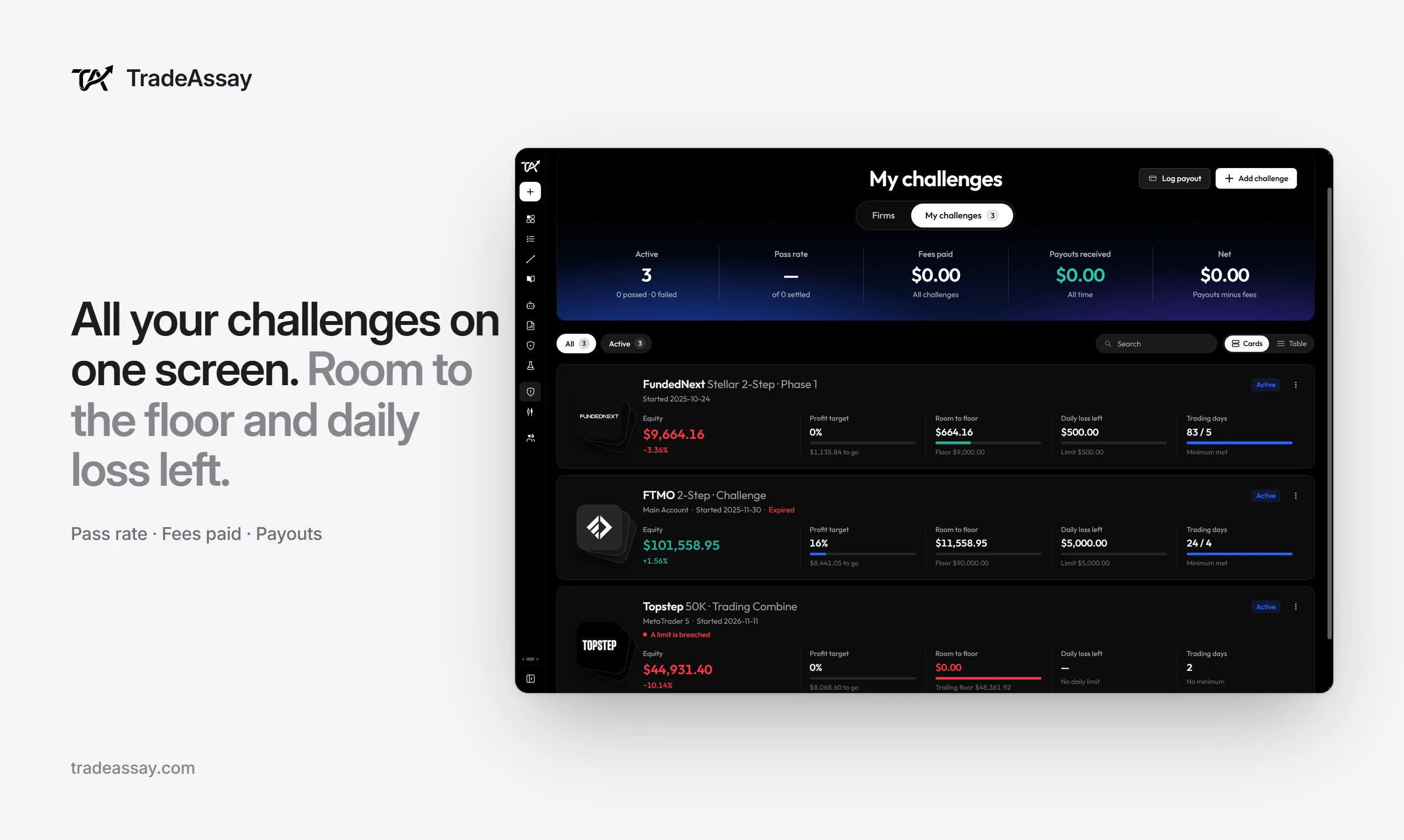
Pick the firm, the challenge and your account size, and its rules fill in: target, daily loss, maximum loss static or trailing, minimum days and the deadline, in your account's dollars and on the firm's own clock. Take the whole challenge as a backtest on real prices before you pay for it, stage after stage, until you pass or a rule ends it. Then link your synced account to the real challenge: every trade updates the target, the floor and the daily loss, with a warning at 75% of today's limit, and the fees and payouts of all your challenges add up to one net figure.

8. Mentor Joining free; coaching on Pro
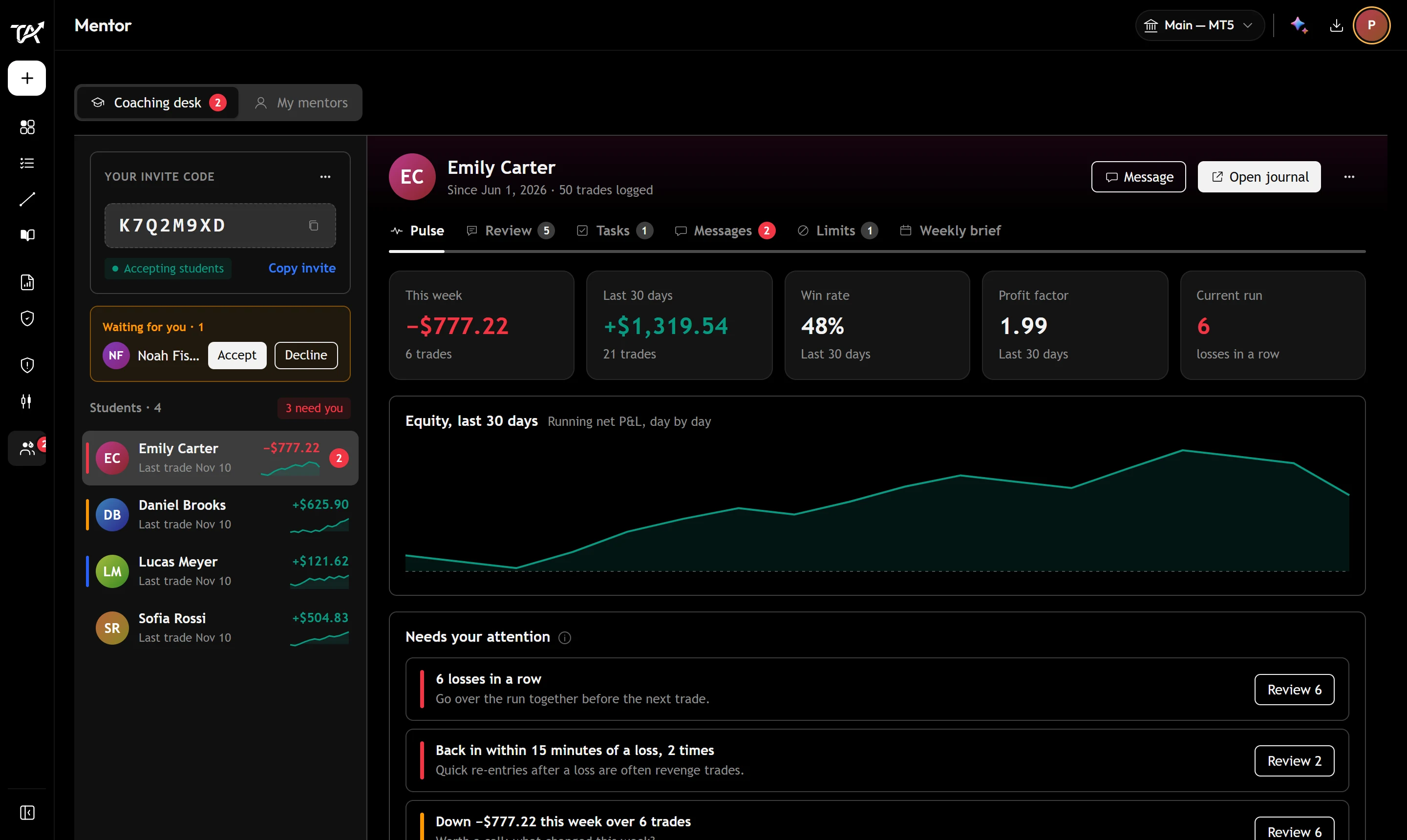
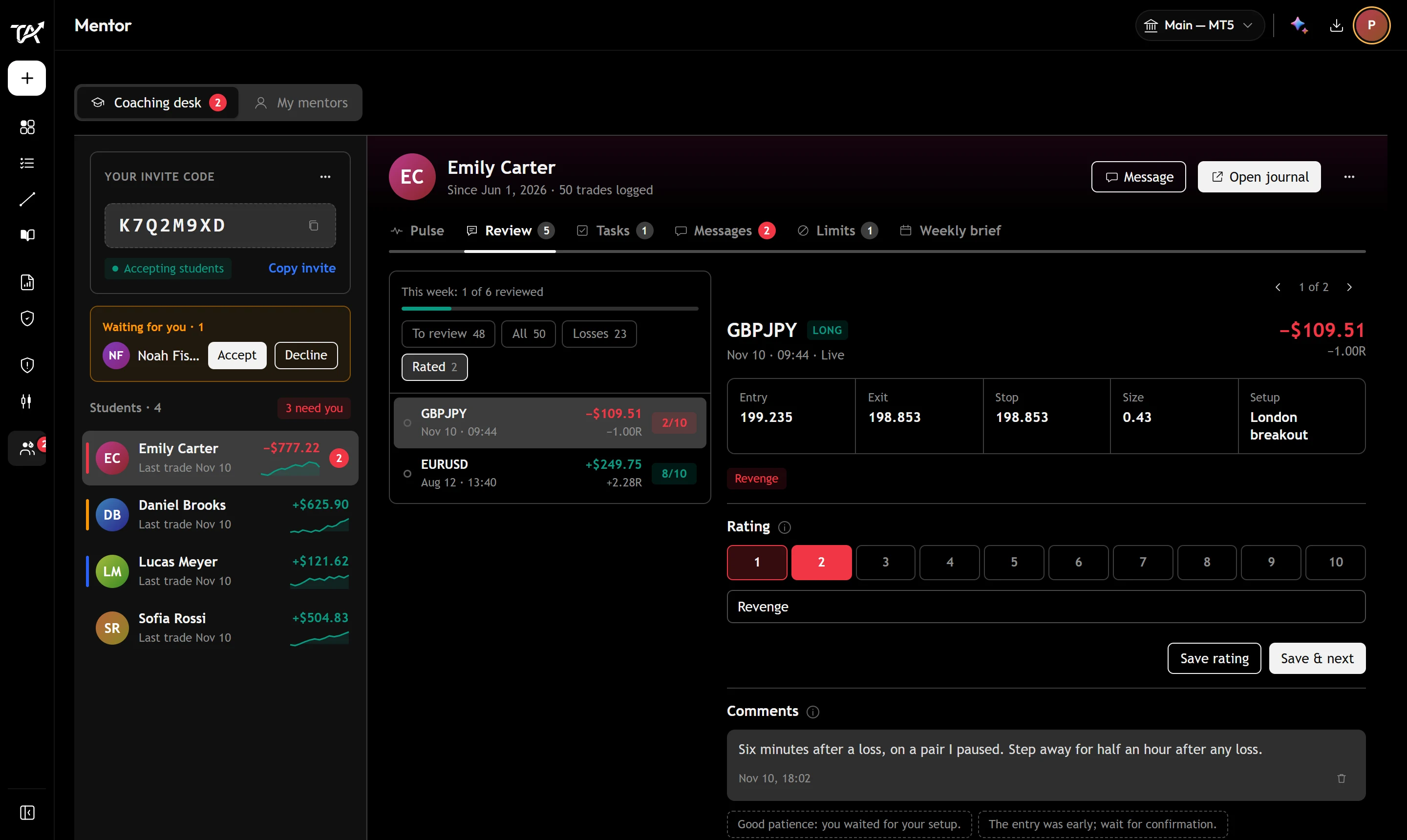
Share one code and your mentor reads your real journal, read-only: every trade, chart and note. They rate each trade's execution from 1 to 10, comment on the trade itself by text or voice, set tasks and send a weekly brief written from your week. Joining a mentor is free on every plan; coaching your own students is on Pro (3) and Elite (any number).
TradeAssay's free plan, exactly
TradeAssay is a trading journal with a bar-by-bar backtester and a prop-firm challenge simulator. Its free plan has no expiry, asks for no card and has no cap on how many trades you log. It is paid for by the traders who upgrade, with no ads, and we do not sell your data.
| Free | Pro, $9.99/mo | |
|---|---|---|
| Trades you can log | Unlimited | Unlimited |
| Getting trades in | Manual entry and file import (MetaTrader reports, CSV, Excel) | Plus automatic sync: MetaTrader, cTrader, Interactive Brokers, Binance, Bybit, Hyperliquid |
| Trading accounts | 1 | Unlimited |
| Journal | Trade list, calendar, day pages, notes, screenshots, playbooks with checklists | The same, plus a voice journal |
| Analysis | Overview, Performance, Breakdown, Compare, Risk, Discipline and Execution | Plus Periods and scores |
| Backtesting | Not on Free; the whole backtester in the 7-day trial | Unlimited sessions on 750 symbols, 1 minute to 12 months |
| Trades on their chart | No | Trade Charts replay, with the AI on each trade |
| Prop firms | No | Rule tracking and a challenge simulator |
| Mentor | Join a mentor | Also coach up to 3 students |
| Export | This month, to CSV or PDF | Any date range |
What the free plan doesn't include: automatic sync, more than one trading account, unlimited backtesting, Trade Charts replay, prop-firm rules, scores and the AI assistant. Saying so here is better than you finding out after signing up. See every plan.
Excel, Google Sheets or Notion instead?
A spreadsheet is a perfectly good free trading journal if you take a few trades a week. Notion lists 197 free trading journal templates, and our free Excel and Google Sheets template works out P&L, R, win rate, expectancy and drawdown from the prices you type. A spreadsheet stops being enough when typing every trade costs you the review, when you trade several accounts, or when you want each trade back on its chart. TradeAssay's Import reads our template whole, so moving later loses nothing.
Start a free trading journal with your MetaTrader history
- Create an account. An email address is all it asks; no card.
- Export your history from MetaTrader 5. Open the Toolbox (Ctrl+T), go to History, right-click, choose Report and save it as HTML or XML. In MetaTrader 4, right-click Account History and Save as Report.
- Import it. Drop the file into TradeAssay's Import. Every trade is shown before anything is saved, with your broker's clock and symbols put right.
- Read it. Your win rate, profit factor, drawdown, best session and hour, in money and in R, and each trade on the calendar.
Frequently asked questions
What is the best free trading journal?
It depends on what you need free. For unlimited trades with real analysis and a taste of backtesting, TradeAssay's free plan has no trade cap, no card and no expiry. For free automatic sync from MetaTrader, TraderWaves (3 accounts) and UltraTrader (one broker) include it on their free plans. For stocks only, TradesViz's free plan allows 3,000 executions a month.
Is there a free trading journal for MetaTrader 5?
Yes. TradeAssay imports your MetaTrader 4 or 5 report for free and measures every trade in R; TraderWaves and UltraTrader sync MetaTrader automatically on their free plans; Myfxbook builds free statistics of an MT4 or MT5 account from the investor password. Automatic cloud sync at TradeAssay, with nothing installed and your computer off, starts at $9.99 a month.
Is TradeAssay really free?
Yes. The free plan has no expiry, no card at sign-up and no cap on how many trades you log: manual entry, file import, the trade list, the calendar, day pages, playbooks, the overview and core analysis, one trading account and 2 backtest sessions of 5 trades. Automatic sync, more accounts and unlimited backtesting are on Pro.
Which trading journals have no free plan?
On 21 November 2026: TradeZella (from $35 a month, no free plan or trial on its pricing page), Edgewonk ($35 a month or $197 a year, with a 14-day refund), TraderSync (a 7-day trial) and TradeSyncer (a 7-day trial that needs a card).
Is there a free trading journal app for my phone?
TraderWaves and UltraTrader have free iOS and Android apps, and StonkJournal installs from the browser as a web app. TradeAssay runs in the browser on any phone, with the same account as on the desktop.
Can I use Excel, Google Sheets or Notion as a free trading journal?
Yes, if you take a few trades a week. Notion lists 197 free trading journal templates, and TradeAssay offers a free Excel and Google Sheets template that works out P&L, R, win rate, expectancy and drawdown. A spreadsheet stops being enough when typing every trade costs you the review; TradeAssay's Import reads its template whole when you move.
Does a free trading journal include backtesting?
Rarely. TradeAssay's 7-day Pro trial opens the whole backtester, and FX Replay's free plan has 2 backtest sessions, but FX Replay is a backtesting tool rather than a journal of your live account. TraderWaves keeps backtesting for Pro.
Which platforms does TradeAssay sync automatically?
MetaTrader 5 and 4, cTrader, Bybit, Bybit TR, Binance, Binance TR, Hyperliquid and Interactive Brokers. MetaTrader 5 syncs on TradeAssay's own cloud servers with the read-only investor password, seconds after each trade closes and with your computer off; MetaTrader 4 syncs from your own terminal; exchanges are checked every 30 seconds. Automatic sync is on Pro and in the 7-day trial; every plan imports statements from 40+ other platforms.
What reports does TradeAssay have?
Eight views of your trades: Overview, Performance, Breakdown, Periods, Compare, Risk, Discipline and Execution, with 19 ways to split them (symbol, session, killzone, weekday, hour, playbook, setup, mistake and more), every figure net of costs, in money and in R, and a Monte Carlo of your own trades. All but Periods are on the free plan.
What happens to my trades if I stop paying?
At TradeAssay, nothing is deleted: the Pro features lock and your trades, notes and screenshots stay, on the free plan, with an export of the current month to CSV or PDF.

Written by the TradeAssay Team, traders with more than seven years of experience in forex, gold, indices and futures. Every other journal's plan and price was read on its own website on 21 November 2026. If something here is out of date, write to support@tradeassay.com and we'll correct it.
A free trading journal with no trade cap, no card and no expiry. Import your MetaTrader history and see your numbers in three minutes.
Start freeTrading foreign exchange, futures and other leveraged products carries a high level of risk and is not suitable for every investor. Product names are the trademarks of their owners and are used only to compare. This page is not investment advice.